
Keyword Research with Google: How to Find SEO Opportunities Using Google’s Own Tools
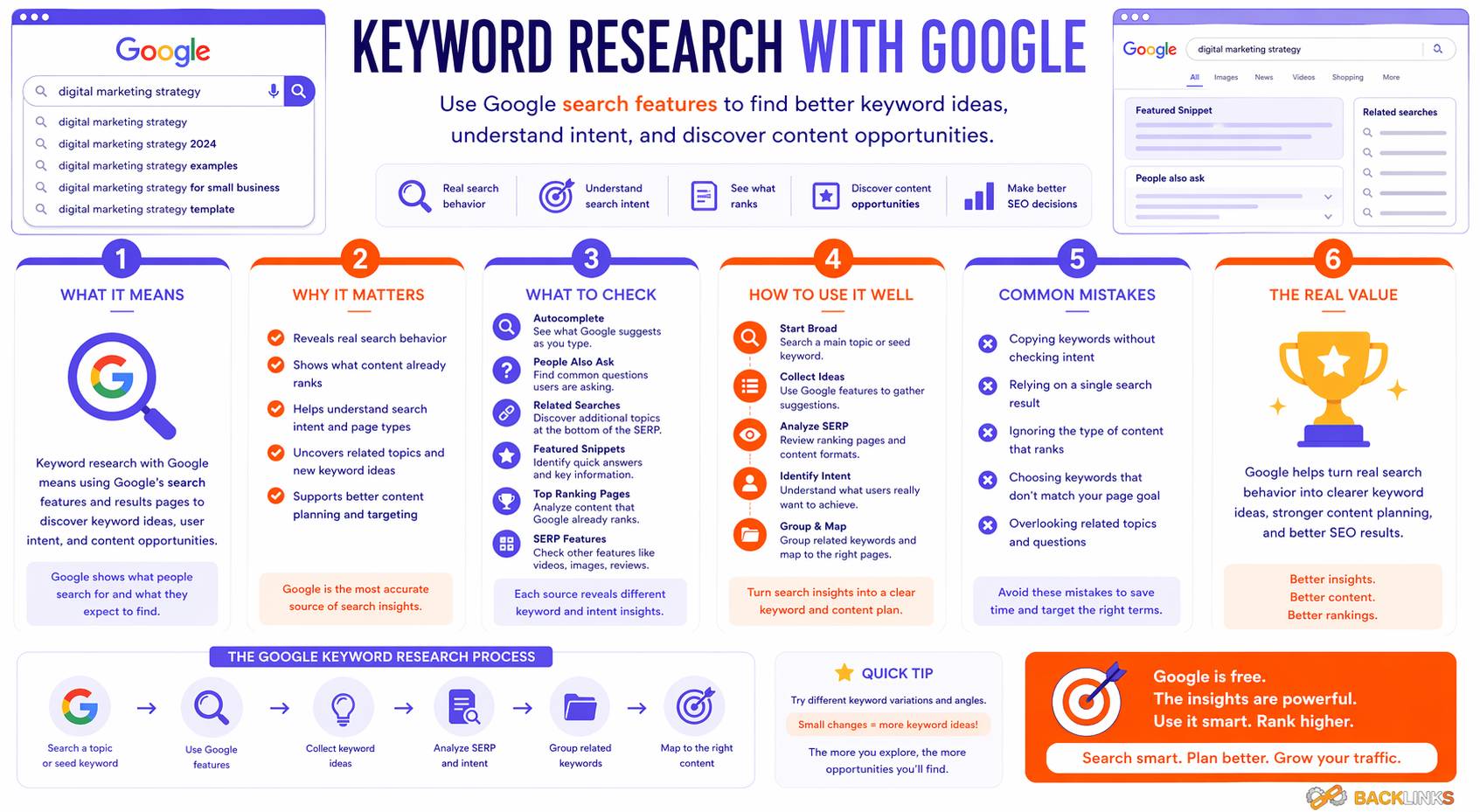
Keyword research with Google means using Google’s search features and free tools to understand what people search for, how they phrase their queries, and which topics may be worth targeting with SEO content. It is one of the most accessible ways to begin keyword research because Google itself provides multiple sources of search insight.
Many SEO tools estimate search volume, difficulty, and competitor rankings, but Google’s own ecosystem can reveal valuable keyword opportunities directly from search behavior. Google Search, Google Autocomplete, People Also Ask, related searches, Google Search Console, Google Keyword Planner, and Google Trends can all support keyword research when used correctly.
However, keyword research with Google should be done strategically. Google tools can provide useful clues, but they do not replace judgment. You still need to analyze search intent, competition, relevance, and content fit before choosing keywords.
This guide explains how keyword research with Google works, which Google tools to use, and how to turn keyword ideas into a practical SEO content plan.
What Is Keyword Research with Google?
Keyword research with Google is the process of using Google’s tools, reports, and search result features to discover and evaluate keywords for SEO.
Instead of relying only on paid SEO platforms, you can use Google sources such as:
- Google Search
- Google Autocomplete
- People Also Ask
- Related searches
- Google Search Console
- Google Keyword Planner
- Google Trends
- Google Business Profile insights, where relevant
Each source provides a different type of insight. Some help you discover new keyword ideas. Others help you understand search intent, review performance, identify trends, or improve existing content.
For example, Google Keyword Planner can help discover keyword ideas and see search-volume estimates, although it is primarily built for Google Ads campaigns. Google Search Console, on the other hand, shows real queries connected to your own website’s performance in Google Search, including clicks, impressions, click-through rate, and average position.
Used together, these tools can give you a strong foundation for SEO keyword research without needing to rely entirely on paid software.
Why Keyword Research with Google Matters
Keyword research with Google matters because Google is often the main search environment SEO teams are trying to understand. When you use Google’s own tools and search features, you can get closer to how users actually search and how Google presents results.
It Helps You Understand Real Search Behavior
Google Search features can reveal the language people use when searching.
Autocomplete predictions appear as you type and are designed to predict what a user may be looking for. These predictions can help you identify natural keyword variations, common modifiers, and long-tail search phrases.
For example, when researching a topic like “keyword research,” Google may suggest related searches involving tools, methods, examples, or beginner guidance. These suggestions can help you understand how users expand the topic.
It Helps Identify Search Intent
Keyword research is not only about finding phrases. It is about understanding what the user expects.
Google search results are one of the best places to analyze intent. If the top results for a keyword are beginner guides, the intent is likely informational. If the results are tool lists or comparison pages, the intent may be commercial. If local packs appear, the keyword may have local intent.
By reviewing the search results directly, you can avoid creating the wrong type of page for the keyword.
It Helps Improve Existing Content
Google Search Console is especially valuable because it shows how your own pages already perform in Google Search. The Performance report can show which queries bring traffic to your site and which pages have strong or weak click-through rates.
This helps you find optimization opportunities. A page may already receive impressions for relevant keywords but not enough clicks. Another page may rank for long-tail queries that are not fully addressed in the content. These insights can guide updates, new sections, and internal links.
It Helps Validate Keyword Ideas
Before creating content, Google tools can help confirm whether a topic has search demand, seasonal interest, or existing visibility.
Google Trends can show search interest by time, location, and popularity, making it useful for understanding whether a topic is growing, declining, seasonal, or regionally concentrated.
This is useful when deciding whether a keyword should be prioritized now, later, or not at all.
Google Tools and Features for Keyword Research
Google provides several useful sources for keyword research. Each one has a different role.
Google Search
Google Search itself is one of the most useful keyword research tools.
When you search a keyword, you can review:
- Ranking page types
- Search intent
- SERP features
- Content formats
- Competitor pages
- Related questions
- Local or commercial signals
For example, if you search “keyword research with Google” and the results are mostly guides, the keyword likely has informational intent. If the results are mostly tool pages, the intent may be more practical or commercial.
Google Search helps you understand what type of content is already being rewarded.
Google Autocomplete
Google Autocomplete shows predictions as users type. Google describes autocomplete as a feature that tries to predict what users are looking for as they enter a search.
For keyword research, autocomplete is useful for finding:
- Long-tail keyword ideas
- Question-based searches
- Topic modifiers
- Popular phrasing patterns
- Searcher language
For example, typing “keyword research with” may reveal suggestions such as:
- keyword research with Google
- keyword research with Google Search Console
- keyword research with Google Keyword Planner
- keyword research with Google Trends
These suggestions can help identify possible article sections or separate content opportunities.
People Also Ask
People Also Ask boxes show questions related to the search query.
These questions are useful for informational content because they reveal what users commonly want to understand.
For example, around keyword research with Google, users may ask:
- How do I do keyword research with Google?
- Is Google Keyword Planner free?
- Can Google Search Console be used for keyword research?
- How do I find keywords using Google Trends?
- What is the best Google tool for keyword research?
These questions can guide headings, FAQ sections, and supporting explanations.
Related Searches
Related searches often appear near the bottom of search results pages.
They can help you expand the topic and find related keyword variations. Related searches are especially useful when building a content outline because they show connected user interests.
For example, related searches for a keyword research topic might include tool names, how-to modifiers, beginner terms, or content planning phrases.
Google Keyword Planner
Google Keyword Planner is a free tool inside Google Ads. Google says it helps users research keywords for Search campaigns, discover new keywords related to a business, and see estimates of searches and costs.
For SEO, Keyword Planner can help with:
- Discovering keyword ideas
- Finding related keyword groups
- Estimating search demand
- Reviewing location-based interest
- Comparing keyword variations
- Finding commercial keyword language
However, it is important to understand its purpose. Keyword Planner is designed for advertising campaigns, so some metrics are more relevant to paid search than organic SEO. For example, competition data in Keyword Planner relates to advertiser competition, not organic ranking difficulty.
Use Keyword Planner as a keyword discovery and demand-estimation tool, not as a complete SEO difficulty tool.
Google Search Console
Google Search Console is one of the most useful tools for SEO keyword research after your site has started receiving impressions.
Its Performance report shows metrics such as queries, clicks, impressions, average position, and click-through rate for Google Search results.
Search Console can help you:
- Find keywords your site already appears for
- Identify pages with high impressions but low clicks
- Discover long-tail queries
- Find content update opportunities
- Improve titles and meta descriptions
- Identify keywords where pages rank but need stronger content
- Track performance after optimization
Unlike general keyword tools, Search Console uses your own website’s actual Google Search data. This makes it especially valuable for improving existing content.
Google Trends
Google Trends helps explore search interest over time, by location, and by popularity.
It is useful for:
- Comparing topics
- Identifying seasonal demand
- Spotting rising interest
- Understanding regional differences
- Avoiding declining topics
- Planning timely content
For example, if one SEO topic shows steady interest while another spikes only seasonally, that insight can affect when and how you publish content.
Google Trends does not give exact monthly search volume in the same way as keyword databases. It is better for understanding relative interest and direction.
Google Business Profile Insights
For local businesses, Google Business Profile data can also support keyword research.
It may reveal how people find your business, what actions they take, and which local searches are important. This can help with location-based keyword planning, especially for service businesses, restaurants, clinics, agencies, and local stores.
Local keyword research should also consider map results, “near me” searches, service-area terms, and city-specific queries.
How to Do Keyword Research with Google
Keyword research with Google works best when you combine discovery, intent analysis, validation, and mapping.
1. Start with a Core Topic
Begin with a broad topic related to your website.
For example:
- Keyword research
- SEO keywords
- Search intent
- Long-tail keywords
- Content optimization
- Internal linking
The core topic gives you a starting point. From there, Google tools can help you find specific keyword variations.
2. Use Autocomplete for Keyword Ideas
Type your core topic into Google and review autocomplete suggestions.
Try adding modifiers such as:
- what is
- how to
- why
- best
- free
- tools
- examples
- for beginners
- near me
- service
For example, with “keyword research,” you may explore:
- keyword research with Google
- keyword research tools
- keyword research for SEO
- how to do keyword research
- keyword research examples
Autocomplete is especially useful for finding how users naturally phrase queries.
3. Review People Also Ask Questions
Search your target topic and look at the People Also Ask questions.
These questions can reveal important subtopics. For informational pages, they often make strong section ideas because they reflect specific user questions.
Do not copy questions mechanically. Use them to understand what the article should answer.
4. Check Related Searches
Review related searches to find additional keyword variations.
Related searches can help you identify:
- Similar terms
- More specific queries
- Tool-related searches
- Comparison topics
- Search intent variations
- Supporting article ideas
If several related searches share the same intent, they may belong in one article. If they show different intent, they may deserve separate pages.
5. Use Google Keyword Planner for Demand Estimates
After collecting keyword ideas, enter them into Google Keyword Planner.
Use it to discover more variations and estimate demand. Keyword Planner can help show which terms have meaningful search activity and which variations may be worth prioritizing.
Be careful with interpretation. Search-volume ranges may be broad, and paid-search competition is not the same as organic SEO competition.
6. Use Google Trends to Check Interest Patterns
Before finalizing priorities, check Google Trends.
This is useful when comparing topics or planning content timing.
For example, Google Trends can help you see whether a keyword has stable interest, seasonal peaks, or growing demand. It can also help compare similar terms to choose the phrasing with stronger interest.
Use Trends as a directional tool, not an exact keyword-volume tool.
7. Analyze the Search Results
Search each priority keyword manually.
Look at:
- What type of pages rank
- Whether results are guides, tools, service pages, or comparisons
- Whether SERP features appear
- How detailed the ranking pages are
- Whether the content is beginner or advanced
- What gaps exist in competing pages
This step helps you determine search intent and content format.
For “keyword research with Google,” users likely expect an informational guide explaining how to use Google’s tools and search features for keyword research.
8. Use Search Console to Improve Existing Pages
If your website already has content, use Search Console to find opportunities.
Look for:
- Pages with high impressions and low clicks
- Queries ranking on page two or lower
- Long-tail queries that need better coverage
- Pages ranking for keywords not fully addressed
- Existing content that could link to the new page
Search Console data is often one of the best sources for practical SEO improvements because it shows where your site already has visibility.
9. Group Keywords by Intent
After collecting and analyzing keywords, group them by intent.
For example:
One page may target:
- keyword research with Google
- how to do keyword research with Google
- Google keyword research
- Google tools for keyword research
Separate pages may be needed for:
- Google Keyword Planner
- Google Search Console keyword research
- Google Trends for SEO
- free keyword tools
Grouping prevents content overlap and keeps each page focused.
10. Map Keywords to Pages
Finally, assign keyword groups to specific pages.
A keyword map should include:
- Primary keyword
- Supporting keywords
- Search intent
- Page type
- Target URL
- Internal link opportunities
- Priority
This turns Google keyword research into an actionable SEO plan.
Using Google Search Console for Keyword Research
Google Search Console deserves special attention because it shows real performance data from your own website.
Find Queries with High Impressions
High impressions show that your site is appearing in search results for a query.
If impressions are high but clicks are low, the page may need:
- A better title
- A stronger meta description
- More relevant headings
- Better intent alignment
- Richer content coverage
This can be a strong optimization opportunity.
Find Keywords Ranking Near Page One
Queries with average positions around 8 to 20 may be close to stronger visibility.
These pages may benefit from:
- Content expansion
- Better internal links
- Improved titles
- Updated examples
- Stronger topic coverage
- Better matching of search intent
These are often practical opportunities because the page already has some relevance.
Find Long-Tail Queries
Search Console often reveals long-tail queries that paid tools may miss or underreport.
These queries can help you improve existing content or create new focused articles.
For example, if a page about keyword research receives impressions for “how to do keyword research with Google Search Console,” that may suggest a useful section or future article.
Compare Queries and Pages
Search Console lets you view performance by both query and page.
This helps identify whether the right page is ranking for the right keyword. If the wrong page appears for an important query, you may need to adjust internal links, headings, content focus, or keyword mapping.
Using Google Keyword Planner for SEO Research
Google Keyword Planner can be useful for SEO, but it should be interpreted correctly.
Discover New Keyword Ideas
Enter a core topic or website URL to generate keyword ideas.
This can help find related terms, variations, and commercial language around a topic.
For example, entering “keyword research” may produce related ideas around SEO tools, keyword planning, keyword analysis, and search campaigns.
Review Search Demand
Keyword Planner can show estimates of search activity. This helps compare whether one variation has more demand than another.
However, do not choose keywords based only on volume. Relevance and intent matter more.
Use Location Filters
Location settings are useful if your audience is in a specific country or region.
Search behavior can vary by market, so location filtering helps make keyword decisions more accurate.
Understand Paid Competition Limits
Keyword Planner competition data reflects advertising competition, not organic SEO difficulty.
A keyword with high paid competition may still have organic opportunities. A keyword with low paid competition may still be difficult organically if strong websites dominate the results.
Always combine Keyword Planner data with manual SERP analysis.
Common Mistakes in Keyword Research with Google
Relying Only on Autocomplete
Autocomplete is useful, but it does not show search volume, ranking difficulty, or business value.
Use it for discovery, then validate with other tools and search analysis.
Treating Keyword Planner as an SEO Difficulty Tool
Keyword Planner is designed for ads. Its competition data should not be confused with organic ranking difficulty.
Use it for keyword ideas and demand estimates, then review the actual search results.
Ignoring Search Console Data
Many websites overlook Search Console even though it shows real query data from their own site.
If your site already has impressions, Search Console can reveal some of your best optimization opportunities.
Choosing Keywords Without Checking Intent
A keyword may look useful, but the search results may show a different intent than expected.
Always check what type of pages are ranking before creating content.
Creating Too Many Similar Pages
Google tools may generate many keyword variations. That does not mean every variation needs a separate page.
If several keywords share the same intent, combine them into one strong article.
Practical Guidance for Keyword Research with Google
Start with Google Search and autocomplete to understand natural user language. Then use People Also Ask and related searches to find supporting questions and subtopics.
Use Keyword Planner to expand the keyword list and compare demand. Use Google Trends to understand interest over time and regional patterns. Use Search Console to improve pages that already have impressions and clicks.
Before publishing, review the search results manually. This is where you confirm intent, content format, and competition.
Finally, organize your findings into a keyword map. Assign one primary keyword group to each page and connect related pages through internal links.
For this topic, a page about keyword research with Google may naturally connect to articles about free keyword tools, keyword research tools, Google Search Console keyword research, keyword strategy, keyword mapping, and search intent SEO.
Timing and Expectations
Keyword research with Google can produce useful insights quickly, but SEO results take time.
Once content is created or updated, Google needs to crawl, index, and evaluate the page. Rankings depend on content quality, search intent alignment, competition, website authority, internal links, backlinks, and technical performance.
For new websites, Google tools can help find long-tail opportunities and lower-competition searches. For established websites, Search Console can reveal content updates that may improve existing visibility.
The best results come from using Google keyword research as an ongoing process, not a one-time task.
Conclusion
Keyword research with Google is a practical way to discover keyword ideas, understand search intent, validate content opportunities, and improve existing SEO performance using Google’s own tools and search features.
Google Autocomplete, People Also Ask, related searches, Keyword Planner, Search Console, and Trends each provide different insights. Autocomplete helps reveal search phrasing. Keyword Planner helps discover keyword ideas and demand estimates. Search Console shows real performance data for your site. Trends helps understand interest over time.
The key is to combine these sources with strategic judgment. Google can show what people search for and how results are presented, but you still need to choose keywords based on relevance, intent, competition, and content quality.
When used correctly, keyword research with Google can support smarter content planning, better optimization, and more sustainable organic growth.