
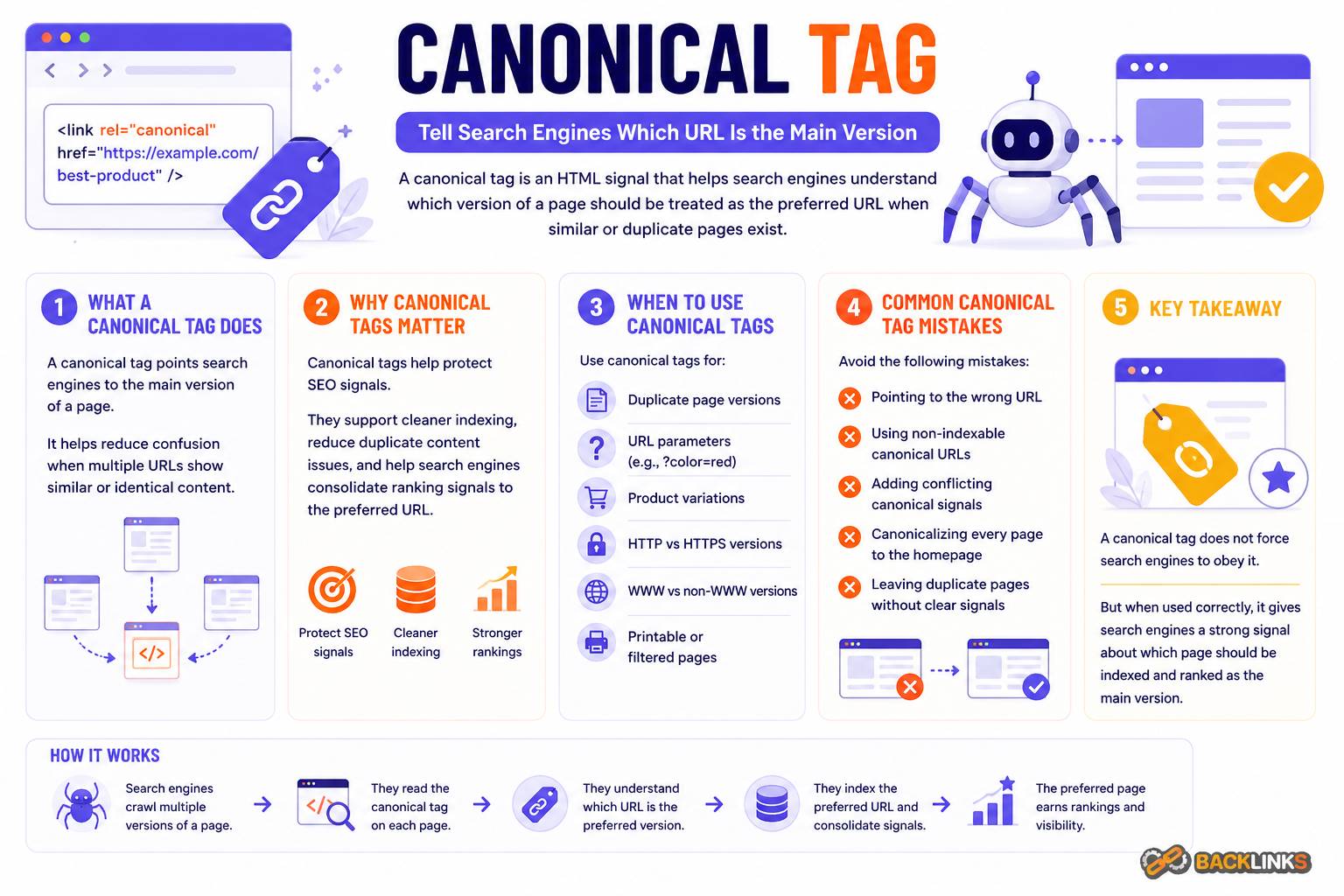
Canonical Tag: How to Manage Duplicate URLs and Protect SEO Signals
Canonical tag is an HTML element that helps search engines understand the preferred version of a page when similar or duplicate content exists across multiple URLs. It is one of the most important technical SEO tools for controlling duplicate content, consolidating ranking signals, and keeping indexation clearer.
A website can easily create multiple URLs that show the same or very similar content. This can happen through tracking parameters, filters, sorting options, product variants, category paths, print versions, pagination, or inconsistent URL formats. Without clear canonical signals, search engines may have to decide which version should be indexed and ranked.
This guide explains what a canonical tag is, why it matters, how it works, and how to use it correctly.
What Is a Canonical Tag?
A canonical tag is a piece of HTML code that tells search engines which URL should be treated as the preferred version of a page.
It usually appears in the <head> section of a page and looks like this:
<link rel="canonical" href="https://example.com/preferred-page/" />In practical terms, the canonical tag says: “This is the main version of this content.”
For example, these URLs might show similar content:
/product-page//product-page/?utm_source=newsletter/category/product-page//product-page/?sort=price
If the preferred page is /product-page/, the other versions can use a canonical tag pointing to that main URL.
Why Canonical Tags Matter for SEO
Canonical tags matter because duplicate and near-duplicate URLs can dilute SEO signals. If search engines find several versions of the same content, links, relevance signals, and crawl attention may become split across multiple URLs.
A canonical tag helps consolidate those signals toward the preferred URL. It also helps search engines choose which version should appear in search results.
Canonical tags are especially useful for:
- Ecommerce product variants
- Filtered category pages
- Tracking parameters
- Syndicated or republished content
- HTTP and HTTPS consistency
- WWW and non-WWW consistency
- Similar landing pages
- Printable page versions
- Sorting and pagination variations
The goal is not to hide poor content. The goal is to clarify which version should represent a set of similar URLs.
How Canonical Tags Work
Canonical tags work as a strong signal, but not an absolute command. Search engines usually respect them when the signal is clear and consistent, but they may ignore them if other signals conflict.
For example, if a page canonicalizes to one URL, but the sitemap, internal links, redirects, and content signals all suggest another URL, search engines may choose a different canonical version.
This is why canonical tags should align with the rest of your technical SEO setup. The canonical URL should usually be:
- Crawlable
- Indexable
- Returning a 200 status code
- The preferred version of the content
- Internally linked consistently
- Included in the XML sitemap where appropriate
A canonical tag is most effective when all signals point in the same direction.
Self-Referencing Canonical Tags
A self-referencing canonical tag points from a page to itself. For example, a page at /canonical-tag/ includes a canonical tag pointing to /canonical-tag/.
This is a common best practice because it clearly confirms the preferred version of the page. It also helps protect against duplicate versions created by parameters or tracking URLs.
A self-referencing canonical tag is useful for most important pages, including service pages, blog posts, category pages, product pages, and landing pages.
Canonical Tags and Duplicate Content
Duplicate content does not always mean a website is doing something wrong. Many websites create duplicate or similar URLs for practical reasons.
For example, ecommerce websites may allow users to filter products by size, color, price, or brand. Blog platforms may create tag archives and category archives. Marketing campaigns may add tracking parameters to URLs.
The problem is not the existence of similar URLs. The problem is failing to manage them.
Canonical tags help search engines understand which page should receive priority. This reduces confusion and helps prevent multiple URL versions from competing against each other.
Canonical Tags vs Redirects
Canonical tags and redirects are related, but they are not the same.
A redirect sends users and search engines from one URL to another. It is best when the duplicate or old URL does not need to remain accessible.
A canonical tag allows the duplicate URL to remain accessible while signaling that another URL is preferred for indexing and ranking.
Use a redirect when a page has permanently moved or should no longer be available.
Use a canonical tag when multiple URLs need to remain accessible but one should be treated as the main version.
For example, if an old blog post URL has changed, a redirect is usually appropriate. If a product can be viewed through several category paths, a canonical tag may be more suitable.
Canonical Tags vs Noindex
A canonical tag is also different from a noindex tag.
A canonical tag says, “Treat another URL as the preferred version.”
A noindex tag says, “Do not include this page in search results.”
Using both on the same page can create mixed signals. If a page is noindexed, search engines may remove it from the index rather than consolidate its signals through the canonical tag.
In most cases, use canonical tags for duplicate consolidation and noindex for pages that should not appear in search results at all.
Common Canonical Tag Mistakes
Canonical tags are powerful, but incorrect implementation can create serious SEO problems.
One common mistake is pointing canonical tags to the wrong URL. If an important page canonicalizes to another page by mistake, it may struggle to appear in search results.
Another mistake is canonicalizing to a redirected or broken URL. The canonical target should be a live, indexable page.
Other common mistakes include:
- Canonical tags pointing to non-indexable pages
- Multiple canonical tags on one page
- Canonical tags that conflict with internal links
- Sitemap URLs that do not match canonical URLs
- Canonicalizing pages with very different content
- Forgetting self-referencing canonicals
- Canonical tags generated incorrectly by plugins or templates
- Using canonicals instead of redirects when the duplicate page should not exist
- Applying the same canonical URL across many unrelated pages
These mistakes often happen during website redesigns, CMS changes, migrations, ecommerce setup, or plugin updates.
How to Audit Canonical Tags
A canonical tag audit should check whether canonical signals are clear, consistent, and aligned with SEO goals.
Start with your important pages. Confirm that each page has the correct canonical tag and that the canonical URL is crawlable, indexable, and returns a 200 status code.
Then look for patterns across templates. Product pages, category pages, blog posts, tag pages, and filtered URLs may all have different canonical needs.
A practical audit should answer:
- Does each important page have a correct canonical tag?
- Does the canonical URL return a 200 status code?
- Is the canonical target indexable?
- Do internal links point to the canonical version?
- Do XML sitemaps include canonical URLs only?
- Are there duplicate pages without canonical control?
- Are unrelated pages canonicalized together?
- Are canonical tags consistent across mobile and desktop versions?
- Are parameters, filters, and variants handled correctly?
The goal is to reduce ambiguity. Search engines should be able to identify the preferred version of each important page without conflicting signals.
Canonical Tags for Ecommerce Websites
Ecommerce websites often need careful canonical tag management because they create many URL variations.
Product pages may appear in multiple categories. Category pages may use filters, sorting options, pagination, and tracking parameters. Product variants may have separate URLs for color, size, or configuration.
Canonical strategy should depend on search value. If a filtered page has unique demand and useful content, it may deserve its own indexable URL. If it is only a duplicate variation, it may need to canonicalize to the main category page.
The worst approach is applying one rule everywhere without reviewing how users search and how the website is structured.
Canonical Tags for Blogs and Content Sites
Blogs and content websites can also create duplicate content through categories, tags, archives, pagination, author pages, and tracking parameters.
A blog article should usually canonicalize to its main article URL. Tag or archive pages should be evaluated based on quality and search value. If they are thin or duplicate, they may need noindex, canonicalization, or better content.
For content syndication or republishing, canonical tags can help indicate the original source or preferred version. However, implementation depends on whether the other site allows canonical control.
Best Practices for Canonical Tag SEO
Use canonical tags carefully and consistently. The best setup is usually simple: every important page has a self-referencing canonical tag, and duplicate or near-duplicate URLs point to the preferred version.
Make sure canonical URLs are clean, final, and indexable. Avoid pointing to redirected pages, noindex pages, blocked URLs, or pages with different intent.
Canonical tags should also match other technical signals. Internal links, XML sitemaps, hreflang tags, redirects, and pagination logic should not contradict the canonical setup.
For large websites, document canonical rules by page type. This helps developers, SEO teams, and content teams avoid accidental conflicts when new templates or URL patterns are created.
How Long Canonical Tag Changes Take
Canonical tag changes are not always reflected immediately. Search engines need to recrawl the affected pages, process the new signals, and decide whether to update the selected canonical URL.
Small changes may be processed faster on frequently crawled pages. Large-scale canonical changes, such as ecommerce filter cleanup or migration-related fixes, can take longer.
After changes are implemented, monitor indexation, crawl activity, canonical reports, organic traffic, and ranking behavior. Canonical tags are signals, so the effect depends on how clearly the rest of the website supports them.
Conclusion
A canonical tag helps search engines identify the preferred version of a page when duplicate or similar URLs exist. It is a key technical SEO tool for managing duplicate content, consolidating signals, and improving indexation clarity.
Canonical tags work best when they are accurate, consistent, and aligned with internal links, XML sitemaps, redirects, and page content. They should not be used casually or applied with one generic rule across every situation.
For websites that want clean technical SEO foundations, canonical tags are essential. They help search engines understand which pages matter most and reduce the risk of duplicate URLs weakening organic search performance.