
Website Speed SEO: How Faster Pages Support Better Search Performance
Website speed SEO is the practice of improving how quickly and smoothly a website loads so users and search engines can access content more efficiently. It is part of technical SEO because page performance affects crawl efficiency, user experience, mobile usability, and the overall quality of a website.
Speed alone does not guarantee rankings. A fast page with thin content, weak search intent alignment, or poor authority may still struggle. But slow performance can hold back otherwise strong pages by creating friction for users and making the website harder to process at scale.
For business owners, marketers, developers, and SEO teams, website speed is not only a technical metric. It affects how people experience your brand, how easily they consume content, and how likely they are to continue browsing, requesting a quote, signing up, or buying. This guide explains what website speed SEO means, why it matters, how it works, and how to improve it strategically.
What Is Website Speed SEO?
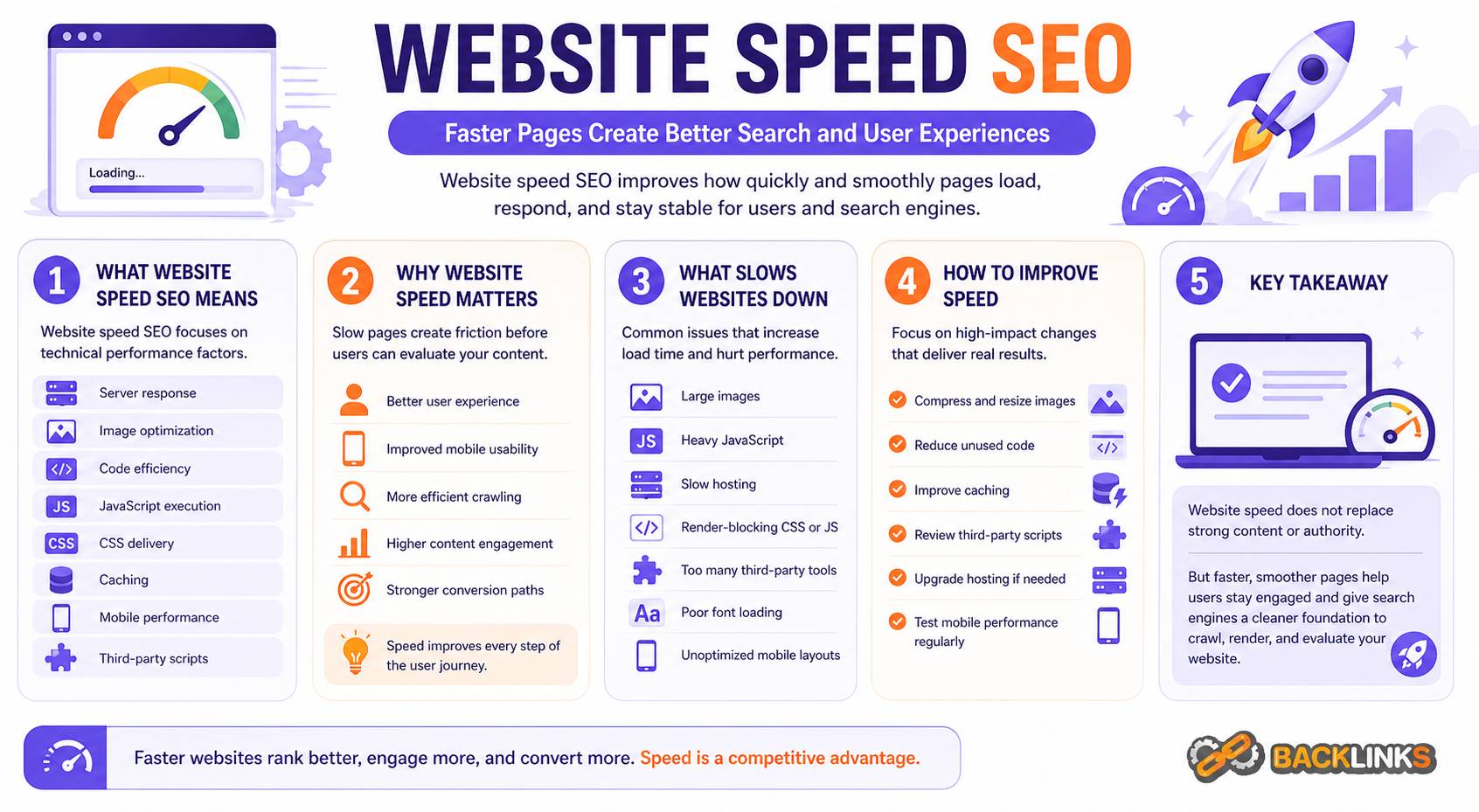
Website speed SEO refers to optimizing website performance so pages load quickly, respond smoothly, and remain stable while users interact with them. It focuses on the technical factors that influence page load time and user experience.
This includes areas such as server response time, image optimization, code efficiency, JavaScript execution, CSS delivery, caching, mobile performance, layout stability, and third-party scripts.
In practical terms, website speed SEO helps answer questions such as:
- How quickly does the main content appear?
- Can users interact with the page without delay?
- Does the layout shift unexpectedly while loading?
- Are images, scripts, and fonts slowing the page down?
- Does the mobile experience feel smooth?
- Are important templates consistently fast across the site?
Website speed SEO is not about chasing perfect scores for their own sake. The goal is to make important pages fast enough to support search visibility, user satisfaction, and business outcomes.
Why Website Speed SEO Matters
Website speed matters because search engines want to send users to pages that are useful, accessible, and reliable. A slow website creates friction before the user even has a chance to evaluate the content.
If a page takes too long to load, users may leave before reading it. If buttons respond slowly, forms feel difficult to complete. If the layout shifts while loading, users may tap the wrong element or lose trust in the page. These issues affect real user behavior, not just technical reports.
From an SEO perspective, speed supports several important outcomes:
- Better user experience
- Stronger mobile usability
- More efficient crawling and rendering
- Lower friction on high-value landing pages
- Better support for content engagement
- More reliable conversion paths
Website speed is especially important for pages that need users to take action, such as product pages, service pages, pricing pages, lead generation pages, and checkout-related content. It also matters for informational content because slow pages can reduce reading depth and internal navigation.
How Website Speed Affects SEO
Website speed affects SEO indirectly and directly through several connected mechanisms.
Search engines evaluate page experience as part of overall quality. They also need to crawl and render pages efficiently. If a website is slow, unstable, or heavy with unnecessary scripts, search engines may need more resources to process it.
Users also respond to speed. A page that loads quickly makes it easier for visitors to read, compare, browse, and convert. A slow page can weaken engagement before the content has a chance to perform.
Speed does not replace relevance. A page still needs to satisfy search intent, provide useful information, and earn trust. But when two pages are similar in usefulness, the page with a smoother experience is usually better positioned to serve users well.
Core Web Vitals and Page Experience
Core Web Vitals are performance metrics that help evaluate real user experience. They are not the only part of website speed SEO, but they are useful because they focus on how people actually experience a page.
The three main areas are loading performance, interactivity, and visual stability.
Loading Performance
Loading performance measures how quickly the main content of a page becomes visible. If the largest visible element loads slowly, users may feel that the page is slow even if smaller elements appear earlier.
Common causes of poor loading performance include oversized images, slow server response times, render-blocking resources, and heavy templates.
Interactivity
Interactivity measures how quickly the page responds when users try to interact with it. A page may appear loaded but still feel sluggish if JavaScript is blocking the browser from responding.
This often happens when a site uses too many scripts, complex tracking tags, large JavaScript bundles, or poorly optimized interactive elements.
Visual Stability
Visual stability measures whether the page layout shifts unexpectedly while loading. Layout shifts can happen when images, ads, fonts, banners, or embedded elements load without reserved space.
A stable layout helps users read and interact with the page confidently.
Key Factors That Slow Down Websites
Website speed problems usually come from a combination of technical decisions. Rarely does one issue explain everything.
Large Images
Images are one of the most common causes of slow pages. High-resolution visuals may look good, but if they are not compressed or resized properly, they can add unnecessary weight.
Images should be served in appropriate dimensions, compressed efficiently, and loaded only when needed. Decorative images should not be heavier than the value they provide.
Heavy JavaScript
JavaScript can make websites interactive, but too much JavaScript can delay loading and responsiveness. This is common on websites with many plugins, tracking scripts, chat widgets, animation libraries, or complex front-end frameworks.
SEO teams should work with developers to identify which scripts are necessary and which can be reduced, delayed, or removed.
Poor Server Response Time
Before a browser can load a page, the server needs to respond. Slow hosting, inefficient database queries, overloaded servers, or poor caching can delay the entire page experience.
Improving server response time often requires backend optimization, better hosting, caching improvements, or content delivery network support.
Render-Blocking CSS and JavaScript
Some resources block the browser from displaying content until they are loaded and processed. If these files are too large or poorly prioritized, users may wait longer before seeing the page.
Optimizing critical CSS, deferring non-essential JavaScript, and reducing unused code can help the page appear faster.
Too Many Third-Party Scripts
Third-party tools such as analytics platforms, heatmaps, advertising tags, chat widgets, review widgets, and personalization scripts can slow down pages. Some are useful, but each one adds weight and risk.
A strong website speed SEO process reviews whether each script is necessary, where it loads, and how much performance cost it creates.
Poor Font Loading
Custom fonts can improve branding, but they can also affect performance if loaded inefficiently. Fonts may delay text rendering or cause layout shifts if fallback styles are not handled well.
Font files should be limited, optimized, and loaded in a way that protects readability.
Website Speed SEO and Mobile Performance
Mobile performance deserves special attention because many users browse on mobile connections and devices with less processing power than desktops.
A page that feels acceptable on a fast desktop connection may feel slow on a mobile device. This is why mobile testing is essential. Website speed SEO should not rely only on office Wi-Fi or high-performance devices.
Mobile speed issues often come from heavy images, large scripts, intrusive popups, complex layouts, unoptimized fonts, and slow server response. These problems can make mobile pages difficult to use, especially for users who are ready to take action.
For SEO, mobile performance matters because search engines need to evaluate the mobile version of the page effectively. Important content, links, structured data, and page functionality should remain accessible and usable on mobile.
Website Speed and Crawl Efficiency
Website speed can also affect how efficiently search engines crawl a website. If a server responds slowly or pages are heavy to process, crawlers may need more time and resources to access content.
For small websites, this may not be a major issue. For large websites, it can become more important. Ecommerce sites, publishers, marketplaces, and SaaS platforms may have many pages that search engines need to revisit. Slow response times and heavy templates can make crawling less efficient.
Faster, cleaner pages help search engines access more important content with less friction. This does not mean every page needs to be extremely minimal, but the website should avoid unnecessary technical weight.
Common Website Speed SEO Mistakes
One common mistake is optimizing only the homepage. The homepage may be important, but organic traffic often lands on service pages, product pages, category pages, blog articles, and location pages. Those templates need performance attention too.
Another mistake is chasing performance scores without considering user experience. A high score is helpful, but the real goal is a fast, stable, usable page. Removing useful content or important conversion elements just to improve a score can create a weaker business outcome.
A third mistake is ignoring third-party scripts. Many websites become slow because every team adds tools over time. Analytics, advertising, tracking, chat, personalization, and review widgets can accumulate until the page becomes heavy.
Other common mistakes include:
- Uploading oversized images
- Using too many plugins
- Loading unused JavaScript on every page
- Ignoring mobile performance
- Failing to cache static resources
- Not reserving space for images or embeds
- Using sliders or animations that add little value
- Testing only one page instead of important templates
- Treating speed as a one-time project
Website speed SEO requires ongoing discipline because performance can decline as a website grows.
How to Improve Website Speed SEO
Improving website speed starts with identifying the pages and templates that matter most. The goal is not to optimize randomly. The goal is to improve the performance of pages that influence search visibility and business results.
Start With High-Value Pages
Begin with pages that receive organic traffic, target important keywords, or support conversions. These may include service pages, product categories, product pages, pricing pages, location pages, and key informational guides.
If a slow template affects hundreds of pages, that should be prioritized over a minor issue on one low-value page.
Compress and Resize Images
Images should be properly sized for their display area. Avoid uploading large files and relying on the browser to shrink them visually.
Use efficient formats where appropriate, compress images without damaging quality, and apply lazy loading for images that appear below the fold. Important above-the-fold images should be prioritized carefully so they do not delay the main content.
Reduce Unused Code
Many websites load CSS and JavaScript that are not needed on every page. Removing unused code can reduce page weight and improve rendering.
This often requires developer support, especially on websites using themes, plugins, or complex front-end frameworks.
Improve Caching
Caching allows browsers and servers to reuse resources instead of loading everything from scratch each time. Good caching can improve repeat visits and reduce server load.
Caching strategies may include browser caching, server-side caching, page caching, and content delivery network caching.
Manage Third-Party Tools
Review every third-party script. Ask whether it is necessary, whether it needs to load on every page, and whether it can be delayed.
Some scripts may be important for analytics or conversions, but others may add little value. Performance work often reveals tools that were added in the past and never reviewed again.
Improve Hosting and Server Performance
If server response time is slow, front-end optimization alone may not be enough. The website may need better hosting, database optimization, caching improvements, or backend cleanup.
This is especially important for ecommerce websites, large CMS websites, and sites with dynamic content.
Website Speed SEO for Different Website Types
Different websites have different performance challenges.
For small business websites, the biggest issues are often oversized images, heavy themes, poor hosting, and too many plugins. Improving these basics can create a noticeably better experience.
For ecommerce websites, speed is critical across category pages, product pages, search pages, and checkout paths. Large image galleries, filters, product scripts, and tracking tools can create performance problems.
For publishers and blogs, ad scripts, embedded media, image-heavy articles, and content recommendation widgets can slow pages down. Performance needs to be balanced with monetization and engagement goals.
For SaaS websites, marketing pages often use animations, tracking scripts, chat tools, and interactive components. These elements should be managed carefully so they support the buying journey without slowing it down.
How to Audit Website Speed SEO
A website speed SEO audit should evaluate both technical metrics and real user experience.
Start by testing important templates, not just the homepage. Review service pages, blog posts, product pages, category pages, and landing pages.
Look for patterns such as slow server response, heavy JavaScript, oversized images, layout shifts, unused code, or third-party script problems.
A practical audit should answer:
- Which important pages are slow?
- Which templates are affected?
- What is causing the delay?
- Does the issue affect mobile users?
- Is the problem caused by images, scripts, server response, CSS, fonts, or third-party tools?
- Which fixes will have the highest impact?
- Who needs to implement the changes?
- How will improvements be measured?
The best audits do not only list warnings. They prioritize fixes based on SEO impact, user impact, and implementation effort.
How Long Website Speed Improvements Take
Some speed improvements can be implemented quickly. Compressing images, removing unnecessary plugins, improving caching, or delaying non-essential scripts may create visible improvements in a short time.
Larger improvements can take longer. Rebuilding templates, reducing JavaScript dependency, changing hosting, improving backend performance, or redesigning page components may require planning and development resources.
The SEO impact may also take time to show. Search engines need to recrawl and reassess pages, and user behavior changes may become clearer after enough data is collected.
Website speed should be treated as ongoing maintenance. New scripts, design changes, content updates, and plugin installations can gradually slow the website again if performance is not monitored.
Practical Guidance for Website Speed SEO
The most effective website speed SEO strategy is practical and balanced. Do not remove useful content or important conversion features simply to make a report look cleaner. Instead, reduce unnecessary weight while protecting the purpose of the page.
Work closely with developers. SEO recommendations should be specific, such as which templates are affected, which resources are slowing the page, and what outcome is expected.
Also involve marketing and analytics teams. Some third-party scripts may be needed, but they should be reviewed honestly. If a tool does not support decision-making, sales, user experience, or measurement, it may not deserve to load on important pages.
For long-term success, include speed checks in normal website workflows. Test before launching new templates, adding major scripts, installing plugins, or redesigning important pages.
Conclusion
Website speed SEO helps create faster, smoother, and more reliable pages for users and search engines. It supports technical SEO by improving crawl efficiency, mobile usability, page experience, and the ability of important content to perform in search.
Speed is not a substitute for strong content or authority, but it protects the value of both. A slow website can weaken user engagement, reduce conversions, and make search performance harder to sustain.
The best approach is to focus on high-value pages, fix the causes of poor performance, monitor mobile experience, and treat speed as an ongoing part of website quality. A faster website gives users fewer reasons to leave and gives search engines a cleaner foundation to process.