
Free Keyword Tools: How to Find SEO Keywords Without Paid Software
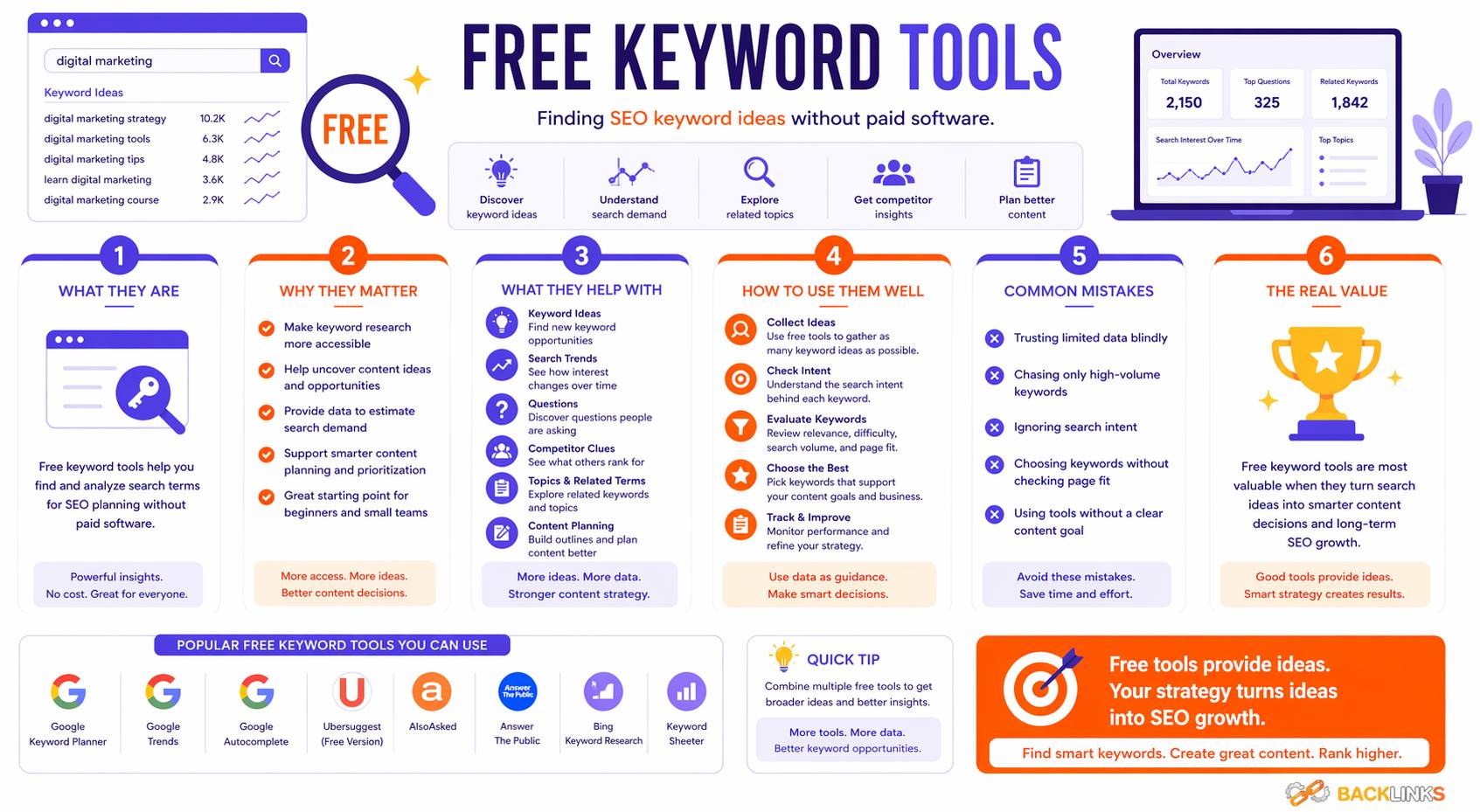
Free keyword tools help you discover search terms, understand audience demand, and plan SEO content without paying for premium keyword research software. They are especially useful for small businesses, new websites, content teams with limited budgets, and anyone learning how keyword research works.
Free tools can show keyword ideas, search trends, related questions, existing website queries, and basic competition clues. Some tools, such as Google Keyword Planner, can help discover keyword ideas and search-volume estimates, while Google Search Console can show the queries that already bring impressions and clicks to your website.
However, free keyword tools have limits. They may provide broad search-volume ranges, limited competitor data, fewer filters, or incomplete keyword databases. The key is to use them strategically. Instead of relying on one tool, combine several free sources to build a clearer view of what people search for and how your content can serve that demand.
This article explains what free keyword tools are, why they matter, which types are useful, and how to use them effectively for SEO content planning.
What Are Free Keyword Tools?
Free keyword tools are platforms, reports, or search features that help you find and analyze keywords without a paid subscription.
They can help you identify:
- Keyword ideas
- Related search terms
- Long-tail keywords
- Search questions
- Search trends
- Existing ranking queries
- Search-volume estimates
- Basic competition signals
- Content opportunities
Some free tools are standalone keyword research platforms. Others are built into search engines, advertising platforms, analytics systems, or webmaster tools.
For example, Google Keyword Planner is designed for Google Ads campaigns, but it can still help SEO teams discover keyword ideas and estimate search demand. Google Search Console is not a traditional keyword discovery tool, but it shows real queries connected to your own website performance in Google Search.
In practical SEO work, free keyword tools are often enough to begin building a useful keyword strategy, especially when you combine tool data with manual search result analysis.
Why Free Keyword Tools Matter
Free keyword tools matter because keyword research should not depend entirely on expensive software. Paid tools can be useful, but many important SEO insights are available through free sources.
They Help Reduce Guesswork
Without keyword data, content planning often relies on assumptions. A business may publish articles because a topic sounds important internally, but that does not mean people search for it using the same language.
Free keyword tools help reveal how users actually search. This makes content planning more evidence-based and less dependent on opinion.
For example, a business may describe a service as “organic growth consulting,” while users may search for “SEO help for small business.” Keyword tools can reveal these differences and help you write content using audience-friendly language.
They Help Find Long-Tail Keywords
Long-tail keywords are specific search phrases that often have clearer intent and lower competition.
Free keyword tools can help uncover long-tail opportunities through autocomplete suggestions, related searches, People Also Ask questions, Search Console queries, and keyword planner suggestions.
Examples include:
- how to find keywords for a blog post
- free keyword tools for SEO beginners
- how to choose keywords for website content
- best free keyword tools for small business
- how to use Google Search Console for keyword research
These terms may have lower search volume individually, but they can attract highly relevant visitors.
They Are Useful for New Websites
New websites often need to target realistic keyword opportunities. Broad, competitive keywords can be difficult to rank for early on.
Free keyword tools help identify specific queries, niche questions, and lower-competition topics that may be more achievable. This allows newer sites to build momentum before competing for broader keywords.
They Support Existing Content Optimization
Free keyword tools are not only useful for new content. They can also help improve existing pages.
Google Search Console is especially useful here because it shows queries, clicks, impressions, click-through rate, and average position for your site in Google Search. These performance reports can help identify pages that already have visibility but need better optimization.
For example, if a page receives impressions for a relevant query but few clicks, the title or meta description may need improvement. If a page ranks for a query but does not answer it clearly, the content may need expansion.
They Help Validate Content Ideas
Before creating a new article, free keyword tools can help confirm whether people search for the topic.
This does not mean every article needs high search volume. Some niche topics are valuable even with low volume. But keyword validation helps make sure your content supports real audience demand.
Types of Free Keyword Tools
Different free keyword tools serve different purposes. The best approach is to combine several types rather than relying on one source.
Search Engine Autocomplete
Search engine autocomplete suggestions appear when you begin typing a query into a search box.
These suggestions can reveal how people phrase searches around a topic. They are especially useful for finding long-tail keywords and question-based searches.
For example, typing “keyword research tools” may reveal variations such as:
- keyword research tools free
- keyword research tools for SEO
- keyword research tools for YouTube
- keyword research tools for small business
Autocomplete is useful because it reflects search behavior, but it does not show exact search volume or competition. It should be used for idea generation, not final prioritization.
Related Searches
Related searches usually appear near the bottom of search results pages.
They show queries connected to the original search. These can help you find supporting topics, keyword variations, and related user concerns.
For example, a search for “free keyword tools” may reveal related searches about keyword planners, SEO tools, Google keyword tools, or long-tail keyword tools.
Related searches are useful for expanding a topic naturally and identifying sections that may belong in an article.
People Also Ask
People Also Ask boxes show common questions related to a search query.
These questions are useful for informational content because they reveal what users want explained.
For a topic like free keyword tools, related questions may include:
- What is the best free keyword research tool?
- Are free keyword tools accurate?
- How do I find keywords for free?
- Can I do keyword research without paid tools?
These questions can guide headings, FAQ sections, and supporting content.
Google Keyword Planner
Google Keyword Planner is a free tool inside Google Ads that helps users discover new keywords and see estimates related to search demand and advertising costs. It is built for campaign planning, but it can also support SEO keyword research when used carefully.
It can help you:
- Discover keyword ideas
- Explore related terms
- Estimate search volume
- Understand keyword demand by location
- Find keyword variations connected to products or services
However, SEO users should remember that Keyword Planner is designed for advertisers. Its competition data relates to paid advertising competition, not organic ranking difficulty.
Google Search Console
Google Search Console is one of the most valuable free keyword tools for websites that already receive search impressions.
Its Performance report shows how your site performs in Google Search, including queries that bring users to your site, clicks, impressions, click-through rate, and average position.
Search Console can help you:
- Find keywords your site already appears for
- Identify pages with high impressions but low clicks
- Discover long-tail queries
- Improve underperforming content
- Find opportunities to expand existing pages
- Monitor changes after optimization
Unlike many keyword tools, Search Console is based on your own site’s real performance data. That makes it especially useful for content updates.
Google Trends
Google Trends helps explore search interest over time and compare topics. Google’s official Trends Help Center provides guidance on using Trends and exploring search behavior.
Google Trends is useful for:
- Comparing topic popularity
- Identifying seasonal patterns
- Spotting rising topics
- Understanding regional interest
- Avoiding declining topics
- Planning timely content
Google Trends does not replace keyword volume tools. It is better for understanding direction and relative interest than exact monthly search volume.
Bing Webmaster Tools
Bing Webmaster Tools includes keyword research features that can help content creators discover popular topics, phrases, and search volumes. Microsoft’s Bing Webmaster documentation describes keyword research as a way to check phrases searchers use and their corresponding search volumes.
This tool can be useful because it provides another search-data perspective beyond Google. It can also help websites understand visibility in Bing search.
Free Browser Extensions
Some browser extensions provide keyword ideas, search-volume estimates, or SERP data directly while you search.
These tools can be useful for quick research, but their data quality varies. Treat them as directional rather than exact.
Use browser extensions for:
- Quick keyword discovery
- SERP checks
- Related keyword ideas
- Competitor page review
- On-page SEO checks
Avoid making major decisions based only on extension data.
Free Versions of Paid SEO Tools
Many paid SEO platforms offer limited free features.
These may include:
- A small number of keyword searches per day
- Basic keyword difficulty estimates
- Limited SERP analysis
- Domain overviews
- Backlink previews
- Keyword suggestions
Free versions can be helpful for small projects or early research, but they often have usage limits. They work best when combined with other free sources.
How to Use Free Keyword Tools Effectively
Free keyword tools are most useful when you follow a structured process.
Start with a Clear Topic
Begin with a topic that matters to your audience.
For example:
- Keyword research
- Free keyword tools
- SEO keywords
- Long-tail keywords
- Search intent
- Content optimization
A clear topic keeps the research focused. If you start too broadly, you may collect too many unrelated keywords.
Collect Keyword Ideas from Multiple Sources
Use several free tools to collect ideas.
For example:
- Use autocomplete to find natural query variations
- Use related searches to find supporting topics
- Use People Also Ask to find questions
- Use Google Keyword Planner for keyword suggestions
- Use Google Trends to check interest patterns
- Use Search Console to find existing impressions
- Use Bing Webmaster Tools for another search-data source
Combining sources gives you a broader view than relying on one tool.
Group Keywords by Intent
After collecting keyword ideas, group them by search intent.
For example:
Informational intent:
- what are free keyword tools
- how to find keywords for free
- free keyword tools for SEO
Commercial investigation:
- best free keyword tools
- free vs paid keyword tools
- Google Keyword Planner alternatives
Tool-specific intent:
- Google Keyword Planner
- Google Search Console keyword research
- Bing Webmaster keyword tool
Grouping by intent helps you decide whether keywords belong on the same page or need separate content.
Review the Search Results
Free keyword tools can show ideas, but the search results show what users likely expect.
Before choosing a keyword, review the ranking pages.
Ask:
- Are the top results guides, tool lists, product pages, or comparison articles?
- Are they beginner-focused or advanced?
- How detailed are they?
- What questions do they answer?
- Are there SERP features such as People Also Ask or videos?
This helps you match content format to search intent.
Prioritize Keywords Realistically
Free tools may not always show complete data, so prioritization should use judgment.
Consider:
- Relevance to your audience
- Search intent clarity
- Competition level
- Content fit
- Business value
- Existing website authority
- Internal link opportunities
Do not choose keywords only because they appear popular. A specific, relevant keyword may be more valuable than a broad keyword with higher volume.
Map Keywords to Pages
Once you have grouped and prioritized keywords, assign them to pages.
Some keywords may belong on existing pages. Others may need new articles.
For example:
- “Free keyword tools” may be a focused informational article
- “Keyword research tools” may be a broader tool-focused guide
- “Google Search Console keyword research” may deserve a separate practical guide
- “Keyword research” may belong to a broader educational page
Keyword mapping helps avoid duplicate content and keeps your website organized.
Use Free Tools for Content Updates
Free keyword tools can also improve existing pages.
Use Search Console to find:
- Queries with high impressions but low clicks
- Pages ranking on lower positions
- Keywords that are relevant but under-covered
- Long-tail queries that could become new sections
- Pages that need stronger titles or headings
Then update the page to better satisfy those searches.
Limitations of Free Keyword Tools
Free keyword tools are useful, but they are not perfect.
Search Volume May Be Incomplete
Free tools often provide limited or approximate search-volume data.
Even paid tools estimate volume, so no keyword volume number should be treated as exact. Use the data as a guide rather than a guarantee.
Competition Metrics May Be Misleading
Some free tools show competition data, but it may not reflect organic SEO difficulty.
For example, Google Keyword Planner competition is designed for advertising, not organic rankings. A keyword may have high ad competition but still have organic opportunities, or the reverse may be true.
Always review the search results manually.
Data May Vary Between Tools
Different tools use different data sources and estimation methods. This means numbers may not match.
One tool may show a keyword as low volume, while another shows more demand. Instead of looking for perfect accuracy, look for consistent patterns.
Free Tools May Have Usage Limits
Many free tools limit the number of searches, reports, exports, or results available.
This can make research slower, especially for large websites. For smaller projects, the limits may still be manageable.
They Do Not Replace Strategy
Free tools can provide keyword ideas, but they cannot decide what is best for your website.
You still need to evaluate:
- Audience relevance
- Search intent
- Content quality
- Business value
- Website authority
- Internal linking
- Competitive context
The strongest keyword decisions come from combining tool data with strategic judgment.
Free Keyword Tools vs Paid Keyword Tools
Free and paid keyword tools both have a place in SEO.
When Free Tools Are Enough
Free keyword tools may be enough when:
- You are starting a new website
- You have a limited content budget
- You need basic keyword ideas
- You want to optimize existing content
- You are targeting a focused niche
- You are learning SEO fundamentals
For many small websites, free tools can support a practical keyword research process.
When Paid Tools May Help
Paid tools may be useful when:
- You manage many pages
- You work in a competitive industry
- You need large keyword databases
- You need advanced competitor analysis
- You need rank tracking
- You need content gap reports
- You manage SEO for multiple clients or markets
Paid tools save time and provide deeper data, but they do not automatically create better SEO strategy.
Practical Guidance for Using Free Keyword Tools
Start with Google Search Console if your site already has data. It shows real queries connected to your own search performance, making it one of the most practical free sources for optimization.
Use Google Keyword Planner for keyword discovery, but interpret its data carefully because it is designed for advertising. Use Google Trends to understand topic direction and seasonality. Use autocomplete, related searches, and People Also Ask to understand natural user language.
Then organize everything into keyword groups. Do not create separate pages for every variation. Group similar terms by intent and assign them to the most appropriate page.
Finally, review search results before writing. Free keyword tools can tell you what people search for, but the SERP tells you what kind of content they expect.
Common Mistakes When Using Free Keyword Tools
Relying on One Tool Only
No free keyword tool gives a complete picture.
Using only one source can lead to missed opportunities or misleading conclusions. Combine multiple tools for better context.
Treating Volume as Exact
Search volume is an estimate. It should help guide priorities, not control them.
A keyword with lower volume may still be valuable if it has strong intent and relevance.
Ignoring Search Intent
Keyword ideas are only useful when you understand intent.
Before creating content, confirm whether users want a guide, definition, comparison, tool, service page, or local result.
Creating Thin Pages for Every Keyword
Free tools may generate many keyword variations. That does not mean every variation needs its own page.
If several keywords share the same intent, combine them into one strong article.
Forgetting to Use Existing Data
Many websites overlook Search Console data and focus only on new keyword ideas.
Existing impressions and queries can reveal some of the best opportunities because your site already has some visibility.
Timing and Expectations
Free keyword tools can help you identify opportunities quickly, but SEO results take time.
After publishing or updating content, search engines need time to crawl, index, and evaluate the page. Performance depends on search intent alignment, content quality, competition, website authority, internal links, backlinks, and technical SEO.
For new websites, free keyword tools can help find specific long-tail opportunities that are more realistic. For established websites, they can uncover content refresh opportunities and queries that already have visibility.
The key is consistency. Free tools can support serious SEO work when used regularly and interpreted carefully.
Conclusion
Free keyword tools are valuable for finding keyword ideas, understanding search demand, identifying long-tail opportunities, and improving existing content without paid software.
They can help you research topics, analyze audience language, review trends, and discover real queries connected to your website. Tools such as Google Keyword Planner, Google Search Console, Google Trends, and Bing Webmaster Tools each provide different types of insight.
However, free tools work best when combined with strategy. Use them to gather evidence, then apply judgment around relevance, search intent, competition, and content quality.
When used well, free keyword tools can support a clear, practical SEO process and help you create content that better matches what your audience is already searching for.