
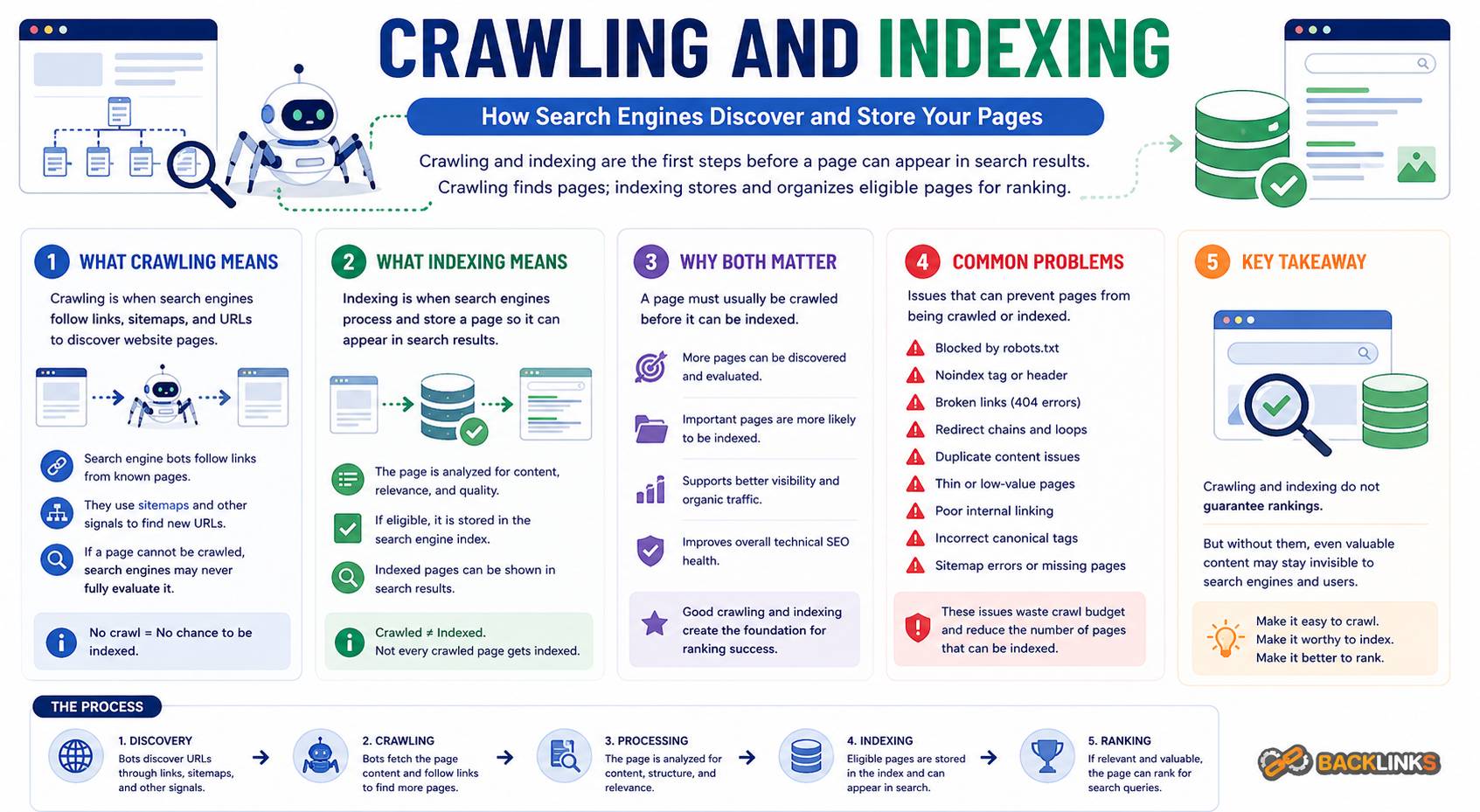
Crawling and Indexing: How Search Engines Discover and Store Your Pages
Crawling and indexing are two of the most important processes behind organic search visibility. Before a page can rank, search engines first need to discover it, access it, understand it, and decide whether it should be stored in their index. If that process breaks down, even a well-written and useful page may never appear in search results.
Many SEO problems are not caused by weak content alone. They happen because search engines cannot find the page, cannot process it properly, or choose not to index it. This is why crawling and indexing sit at the center of technical SEO.
For business owners, marketers, and SEO professionals, understanding these concepts helps explain why some pages rank, some pages disappear, and some pages never gain traction despite being published. This guide explains what crawling and indexing mean, how they work, why they matter, and how to manage them strategically.
What Are Crawling and Indexing?
Crawling and indexing are two separate but connected stages in how search engines process web pages.
Crawling is the discovery and access stage. Search engines use bots, often called crawlers or spiders, to follow links, visit URLs, request page resources, and gather information about the content.
Indexing is the storage and evaluation stage. After a page is crawled, the search engine decides whether the page should be added to its index. The index is the search engine’s database of pages that may be shown in search results.
A simple way to understand the difference is this:
Crawling asks, “Can we find and access this page?”
Indexing asks, “Should this page be stored and considered for search results?”
A page can be crawled but not indexed. For example, a page may be accessible to search engines but marked with a noindex tag. It may also be too similar to another page, canonicalized to a different URL, blocked by technical signals, or considered too low in value to include.
Why Crawling and Indexing Matter
Crawling and indexing matter because they determine whether your pages can participate in organic search at all. Ranking is not the first step. A page must be discovered and indexed before it can compete.
If search engines cannot crawl a page, they may not understand that it exists or may not be able to evaluate its content. If search engines crawl a page but choose not to index it, the page cannot appear for relevant search queries.
This affects every type of website. A service business may lose visibility if key landing pages are not indexed. An ecommerce site may struggle if category pages are crawlable but product variants create duplicate indexing problems. A publisher may lose search traffic if new articles are not discovered quickly. A SaaS website may underperform if important feature pages are buried too deeply in the site structure.
Crawling and indexing are also important because they influence how efficiently search engines process your website. A clean website helps search engines focus on important pages. A messy website may waste crawl activity on duplicate URLs, broken links, redirects, filters, and low-value pages.
How Crawling Works
Crawling starts when a search engine discovers a URL. This can happen through internal links, external links, XML sitemaps, redirects, previously known URLs, or other discovery signals.
Once a crawler finds a URL, it requests the page from the server. The server responds with a status code, page content, and related resources such as CSS, JavaScript, and images. The crawler then analyzes the page and may follow links to discover more URLs.
Crawling is not unlimited. Search engines decide how often and how deeply to crawl a website based on many factors, including website authority, update frequency, server performance, site structure, and perceived page quality.
This is why crawl efficiency matters. If a website creates thousands of low-value URLs, search engines may spend unnecessary time processing pages that do not support organic search goals.
Key Factors That Affect Crawling
Several technical elements influence how easily search engines can crawl a website.
Internal Links
Internal links are one of the strongest discovery paths on a website. If important pages are linked from navigation, category pages, pillar pages, or related content, crawlers can find them more easily.
Pages with no internal links are often called orphan pages. They may still be discovered through sitemaps or external links, but they are harder for search engines to understand in context.
A strong internal linking structure helps crawlers move through the website logically. It also signals which pages are central to the site’s topics.
Site Architecture
Site architecture affects how pages are grouped, connected, and prioritized. A clear structure helps crawlers understand which pages are broad, which are supporting, and how different topics relate to one another.
For example, a technical SEO section may include supporting pages about crawling, indexing, XML sitemaps, robots.txt, canonical tags, redirects, structured data, and website speed. When these pages are connected clearly, search engines can better understand the topic cluster.
Poor architecture can bury valuable pages too deeply. If a page requires many clicks from the homepage or receives few internal links, it may be crawled less often and treated as less important.
XML Sitemaps
An XML sitemap helps search engines discover important URLs. It is especially useful for large websites, newly published content, pages that are updated regularly, and pages that may not yet have many internal links.
A sitemap should include only canonical, indexable, valuable URLs. It should not include redirected pages, blocked pages, noindex pages, duplicate URLs, or low-value filtered URLs.
A clean sitemap supports crawling. A messy sitemap sends mixed signals.
Robots.txt
The robots.txt file gives instructions about which parts of a website crawlers may or may not access. It can be useful for preventing crawl waste on low-value areas, but it must be handled carefully.
If important pages or resources are blocked by robots.txt, search engines may not be able to evaluate the content properly. Blocking a URL also does not always remove it from search results if the URL is discovered elsewhere. It simply prevents crawling.
Robots.txt should be used for crawl control, not as the only method for managing indexation.
Server Response and Status Codes
Every time a crawler requests a URL, the server returns a status code. These codes tell search engines what happened.
A 200 status code means the page is available. A 301 indicates a permanent redirect. A 302 indicates a temporary redirect. A 404 means the page was not found. A 410 means the page is gone.
Incorrect status codes can create crawl and indexing problems. For example, a deleted page that still returns 200 may be treated as a soft 404. A redirect chain can waste crawl activity. A broken page linked internally can send crawlers to dead ends.
Clean status code management helps crawlers move through the website efficiently.
How Indexing Works
After crawling a page, search engines decide whether to include it in their index. This decision is based on technical signals, content signals, duplication, quality, canonicalization, and relevance.
Indexing does not mean the page will rank well. It only means the page is eligible to appear in search results. A page still needs relevance, usefulness, authority, and competitive strength to perform.
Search engines may choose not to index a page for several reasons. The page may be blocked from indexing, duplicate another page, have very little unique value, return an unexpected status code, or point to another canonical URL.
Indexing is selective. Search engines do not need to index every URL they crawl. Their goal is to maintain a useful index, not a complete archive of every accessible page.
Key Factors That Affect Indexing
Indexing depends on both technical eligibility and perceived page value.
Noindex Tags
A noindex tag tells search engines not to include a page in search results. This can be useful for pages such as internal search results, thank-you pages, staging pages, duplicate utility pages, or thin filtered pages.
However, accidental noindex tags are a common cause of visibility problems. If a valuable page is marked noindex, it may be excluded from search results even if the content is strong.
Noindex rules should be reviewed regularly, especially after migrations, CMS changes, plugin updates, or template changes.
Canonical Tags
Canonical tags help search engines identify the preferred version of a page when similar or duplicate URLs exist.
For example, the same product or article may be accessible through several URL variations. A canonical tag points search engines toward the version that should receive the main indexing and ranking signals.
Canonical tags are helpful, but they must be consistent. If internal links, sitemap URLs, redirects, and canonical tags all point to different versions, search engines may ignore the signal or choose a different canonical URL.
Duplicate Content
Duplicate content can make indexing less efficient. If multiple URLs contain the same or very similar content, search engines may choose only one version to index.
This is common with tracking parameters, filters, sorting options, product variants, tag pages, archive pages, and inconsistent URL formats.
Duplicate content is not always a penalty issue. The bigger problem is confusion. Search engines may not know which page to prioritize, and ranking signals may become split across multiple URLs.
Content Quality and Uniqueness
Search engines are more likely to index pages that provide distinct value. Thin, repetitive, automatically generated, or low-usefulness pages may be crawled but not indexed.
This is especially important for websites that publish many similar pages. Location pages, product pages, category pages, and tag pages should have a clear purpose and enough unique value to justify indexing.
Technical SEO can make a page eligible for indexing, but the page still needs meaningful content.
Internal Linking and Page Importance
Pages that receive strong internal links are easier for search engines to discover and understand. Internal links also indicate that a page is important within the website.
A page may be technically indexable but still perform poorly if it is isolated. If it receives no contextual links and sits outside the main structure, search engines may treat it as less important.
Internal linking is therefore both a crawling and indexing signal.
Crawling vs Indexing: The Main Difference
Crawling and indexing are often mentioned together, but they are not the same.
Crawling means search engines can access the page. Indexing means the page is stored and eligible to appear in search results.
A page can be:
- Crawled and indexed
- Crawled but not indexed
- Discovered but not crawled
- Blocked from crawling
- Indexed historically but later removed
- Canonicalized to another URL
This distinction matters when diagnosing SEO problems. If a page is not ranking, first check whether it is indexed. If it is not indexed, check whether it can be crawled. If it can be crawled but is not indexed, review indexation signals, canonical tags, duplication, and content quality.
Understanding where the process breaks helps avoid wasting time on the wrong fix.
Common Crawling and Indexing Problems
Many organic search problems begin with crawl or indexation issues.
One common problem is publishing pages that are not internally linked. These orphan pages may exist in the CMS but remain difficult for search engines to discover and understand.
Another common issue is including poor URLs in XML sitemaps. If a sitemap contains redirected, blocked, noindex, or duplicate URLs, it becomes less useful as a discovery signal.
Accidental noindex tags can also cause major problems. This often happens during redesigns, staging-to-production launches, or template updates.
Other common crawling and indexing issues include:
- Important pages blocked by robots.txt
- Redirect chains and redirect loops
- Broken internal links
- Duplicate URL variations
- Canonical tags pointing to the wrong page
- Thin pages being indexed
- Valuable pages missing from sitemaps
- JavaScript content not rendering properly
- Server errors preventing crawling
- Parameter URLs creating crawl waste
- Pagination or faceted navigation problems
These issues can affect one page, one section, or an entire website depending on how they are implemented.
How to Check Crawling and Indexing
A practical review should combine crawler data, search engine reports, analytics, and manual checks.
Start with important pages. Confirm that they return a 200 status code, are not blocked by robots.txt, do not contain a noindex tag, have a self-referencing or appropriate canonical tag, and are linked internally.
Then review XML sitemaps. Make sure they include only pages that should be crawled and indexed. Remove URLs that are redirected, blocked, noindex, duplicated, or low value.
Next, check for pages that search engines are discovering but not indexing. This can reveal quality issues, duplication, weak internal linking, or technical conflicts.
Finally, review sitewide patterns. A single page problem may be isolated, but template-level issues can affect hundreds or thousands of URLs.
How to Improve Crawling
Improving crawling starts with making important pages easier to discover and reducing unnecessary crawl waste.
A strong crawling strategy should include:
- Clear navigation
- Logical site architecture
- Contextual internal links
- Clean XML sitemaps
- Correct robots.txt rules
- Minimal redirect chains
- Fewer broken links
- Controlled parameter URLs
- Stable URL structure
- Fast and reliable server responses
The goal is not to force search engines to crawl every URL. The goal is to make sure they can efficiently crawl the URLs that matter.
For large websites, crawl management may also involve controlling filters, tag pages, search result pages, and other automatically generated URLs. These pages should be evaluated carefully. Some may have search value, while others may create unnecessary duplication.
How to Improve Indexing
Improving indexing starts with making sure the right pages are eligible, accessible, and valuable.
Important pages should have unique content, clear search intent, proper canonical tags, internal links, and indexable status. They should not be accidentally blocked, noindexed, or buried too deeply.
Low-value pages should be managed deliberately. Some should be noindexed. Some should be canonicalized. Some should be redirected. Some may need to be improved or removed.
Indexing strategy is not about getting every page into search results. It is about making sure the pages that appear in search results are useful, relevant, and aligned with business goals.
A website with fewer high-quality indexed pages often performs better than a website with many weak or duplicate indexed URLs.
Crawling and Indexing for Different Website Types
Different websites face different crawl and indexation challenges.
For small service websites, the main priority is usually making sure key pages are indexable, internally linked, and included in a clean structure. Problems often come from accidental noindex tags, weak internal linking, or missing pages from navigation.
For ecommerce websites, the challenge is often URL control. Product variants, filters, sorting options, pagination, and category combinations can create many URLs. Some are valuable. Many are not. Technical decisions should define which URLs should be indexed and which should remain out of search results.
For publishers and blogs, crawling and indexing depend on article freshness, internal links, category structure, archives, tags, and content quality. Large archives may need pruning, consolidation, or better organization.
For SaaS websites, important pages may include product features, use cases, integrations, comparison pages, documentation, and educational content. These pages should be easy to discover and clearly connected.
Common Mistakes to Avoid
A major mistake is assuming that publishing a page means it will automatically appear in search results. Publication only makes a page live. It does not guarantee crawling, indexing, or ranking.
Another mistake is using robots.txt to control indexing. Robots.txt can block crawling, but it is not the same as a noindex directive. If the goal is to keep a page out of search results, the method should be chosen carefully based on the page and situation.
Many websites also over-index low-value pages. This can make the site look weaker overall and make it harder for search engines to identify the most useful content.
Other mistakes include changing URL structures without redirects, relying only on XML sitemaps instead of internal links, ignoring canonical conflicts, and treating crawl errors as separate from business priorities.
Practical Guidance for Crawling and Indexing
The best approach is to define which pages deserve search visibility before making technical decisions.
Start by grouping URLs into categories. Identify core pages, supporting content, product or service pages, utility pages, filtered pages, duplicate variations, outdated pages, and pages with no search value.
Then decide what should happen to each group. Some should be indexable and internally linked. Some should be noindexed. Some should be canonicalized. Some should be redirected. Some should be removed or improved.
This creates a cleaner, more intentional website.
For growing websites, crawling and indexing should be reviewed regularly. New templates, plugins, filters, tags, and content sections can create unexpected URLs. Regular audits help prevent index bloat, crawl waste, and technical conflicts.
How Long Crawling and Indexing Changes Take
The timeline depends on how often search engines crawl your website and how significant the changes are.
Some updates may be processed quickly, especially on frequently crawled pages. Others may take longer, particularly for deeper pages, low-authority websites, large structural changes, or pages with weak internal links.
Fixing crawl access does not guarantee immediate indexing. Search engines still need to evaluate whether the page should be included. Similarly, improving content does not guarantee instant visibility if the page has not been recrawled yet.
Patience matters, but so does monitoring. After major changes, review crawl activity, indexation status, sitemap signals, internal links, and organic performance to confirm that search engines are processing the updates as intended.
Conclusion
Crawling and indexing are the foundation of organic search visibility. Crawling allows search engines to discover and access your pages. Indexing determines whether those pages are stored and eligible to appear in search results.
Strong SEO performance depends on both. If important pages cannot be crawled, they may never be evaluated. If they are crawled but not indexed, they cannot rank. If too many low-value pages are indexed, search engines may receive weak or confusing signals about the site.
A strategic approach to crawling and indexing helps search engines focus on the pages that matter most. It improves technical clarity, protects content value, and supports long-term organic growth.