
Robots.txt SEO: How to Control Crawling Without Hurting Search Visibility
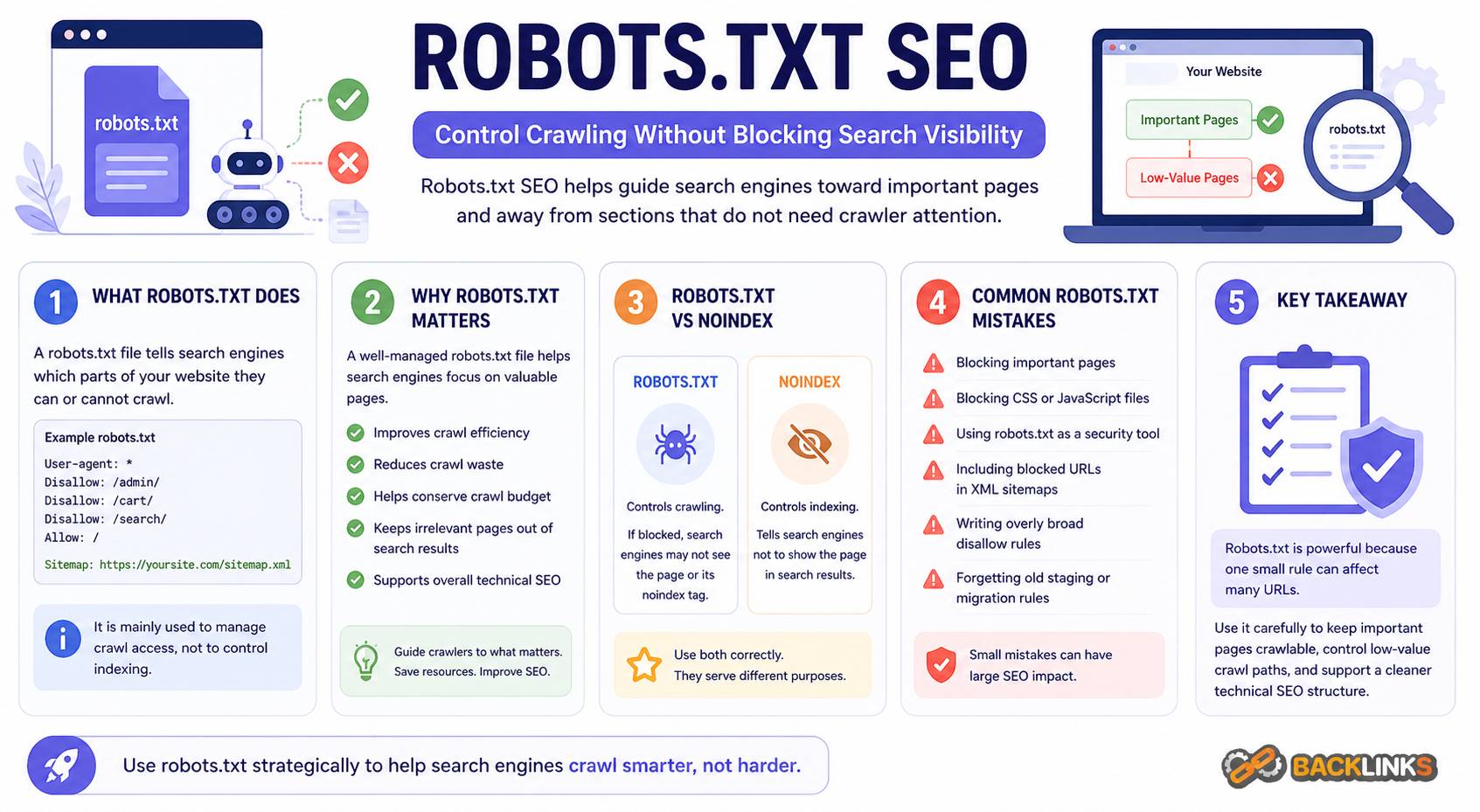
Robots.txt SEO is the practice of using the robots.txt file to guide search engine crawlers toward the right areas of your website and away from sections that do not need to be crawled. It is a small file, but it can have a major impact on technical SEO when used correctly.
A robots.txt file helps manage crawler access. It can reduce crawl waste, protect low-value sections from unnecessary crawling, and support cleaner technical SEO management. However, it can also create serious problems if important pages or resources are blocked by mistake.
For business owners, marketers, developers, and SEO teams, understanding robots.txt is important because it affects how search engines interact with a website. This guide explains what robots.txt is, how it works, why it matters, and how to use it safely.
What Is Robots.txt?
Robots.txt is a text file placed in the root directory of a website. It gives instructions to search engine crawlers about which parts of the website they are allowed or not allowed to crawl.
For example, a robots.txt file can tell crawlers not to access internal search result pages, admin areas, cart pages, filtered URLs, or other low-value sections.
In practical terms, robots.txt is a crawl management tool. It helps control crawler behavior, but it does not directly control whether a page appears in search results.
This distinction matters. Blocking a URL in robots.txt prevents crawlers from accessing the page, but it does not always guarantee that the URL will disappear from search results if search engines discover it through other links. If the goal is to prevent a page from being indexed, other methods such as a noindex directive may be more appropriate.
Why Robots.txt SEO Matters
Robots.txt SEO matters because crawling is the first step in organic search discovery. Search engines need to access pages before they can understand and evaluate them.
A well-managed robots.txt file can help search engines focus on the parts of your website that matter most. This is especially useful for websites with many URL variations, such as ecommerce sites, publishers, marketplaces, and large content websites.
For example, a website may generate many URLs through filters, sorting options, tracking parameters, internal search results, or account pages. Many of these URLs do not need to be crawled. If search engines spend too much time on low-value sections, important pages may receive less crawl attention.
Robots.txt can help reduce that waste. But it must be used carefully. Blocking the wrong section can prevent search engines from accessing important pages, CSS files, JavaScript files, images, or resources needed to understand the page.
How Robots.txt Works
When a search engine crawler visits a website, it usually checks the robots.txt file first. The file contains rules that apply to different crawlers.
A basic robots.txt rule includes two main parts:
- User-agent: the crawler the rule applies to
- Disallow or Allow: the path the crawler should not or should access
For example, a rule may tell all crawlers not to crawl a specific folder. Another rule may allow access to one URL inside a broader blocked section.
Robots.txt rules are based on URL paths. This means small differences in structure can matter. A misplaced slash, overly broad rule, or incorrect path can accidentally block far more than intended.
The file can also include a sitemap location, helping search engines find the XML sitemap more easily.
Robots.txt Is Not the Same as Noindex
One of the most common misunderstandings in robots.txt SEO is confusing crawl control with index control.
Robots.txt controls crawling. Noindex controls indexing.
If you block a page in robots.txt, search engines may not be able to crawl the page and see a noindex tag on it. This means robots.txt can actually prevent search engines from seeing the directive that tells them not to index the page.
For pages that must stay out of search results, robots.txt is not always the best solution. A noindex tag is often more appropriate if the crawler is allowed to access the page. For private or sensitive content, proper authentication is necessary. Robots.txt should never be treated as a security tool.
Use robots.txt to manage crawl access, not to hide confidential pages.
What Should Be Blocked in Robots.txt?
Robots.txt should be used to block sections that do not need to be crawled and do not support organic search visibility.
Common examples may include:
- Admin areas
- Internal search result pages
- Cart and checkout paths
- Account pages
- Login pages
- Low-value filter combinations
- Duplicate parameter paths
- Staging folders, if publicly accessible
- Script-generated crawl traps
The exact rules depend on the website. A small service website may need very few restrictions. A large ecommerce site may need more detailed crawl controls.
The key question is whether crawling that section helps search engines understand and rank valuable content. If it does not, robots.txt may be useful.
What Should Not Be Blocked?
A robots.txt file should not block important pages or resources that search engines need to evaluate the website.
Avoid blocking:
- Main service pages
- Product categories with search value
- Important product pages
- Blog posts and guides
- CSS files needed for rendering
- JavaScript files needed for page functionality
- Images that support indexed content
- Canonical pages
- Pages you want search engines to index
Blocking important resources can create rendering problems. Search engines may not understand the layout, mobile usability, or visible content correctly if key files are inaccessible.
Before blocking any section, confirm that it is not needed for crawling, rendering, indexing, or user experience.
Robots.txt and XML Sitemaps
Robots.txt and XML sitemaps often work together in technical SEO.
Robots.txt can include the location of the XML sitemap. This helps crawlers discover the sitemap and find important URLs. However, the two files should not send conflicting signals.
For example, your XML sitemap should not include URLs that are blocked by robots.txt. If a sitemap says a URL is important but robots.txt says crawlers cannot access it, search engines receive mixed instructions.
A clean technical setup keeps these signals aligned. Important, indexable URLs belong in the sitemap and should be crawlable. Low-value or blocked sections usually should not appear in the sitemap.
Robots.txt and Crawl Budget
Crawl budget refers to the attention search engines spend crawling a website. For small websites, crawl budget is usually not a major concern. For larger websites, it can become more important.
Large websites often generate many unnecessary URLs. Faceted navigation, sort options, internal searches, calendar pages, tags, and parameters can create thousands of crawlable paths.
Robots.txt can help reduce crawl waste by blocking sections that do not need crawler attention. This can help search engines focus more efficiently on important URLs.
However, robots.txt should not be the only crawl budget strategy. Strong internal linking, clean URL structure, canonical tags, redirects, sitemap hygiene, and content quality all matter.
Common Robots.txt SEO Mistakes
Robots.txt mistakes can cause serious SEO problems because a single rule can affect many URLs.
One common mistake is blocking the entire website during development and forgetting to remove the rule after launch. This can prevent search engines from crawling the live website.
Another mistake is blocking pages that should rank. For example, blocking /blog/ or /products/ would prevent crawlers from accessing important content.
Other common mistakes include:
- Blocking CSS or JavaScript files needed for rendering
- Blocking URLs that contain noindex tags
- Using robots.txt to hide private content
- Including blocked URLs in XML sitemaps
- Writing overly broad Disallow rules
- Not testing rules before publishing
- Forgetting to update robots.txt after a migration
- Blocking parameter URLs without understanding their SEO value
- Assuming robots.txt guarantees deindexing
These mistakes often happen because robots.txt looks simple. In reality, it needs careful planning.
How to Audit a Robots.txt File
A robots.txt audit should check whether the file supports the website’s SEO goals without blocking important content.
Start by reviewing the file location. It should be accessible at the root of the domain. Then review each rule and identify which user-agent it applies to.
Next, test important page types. Confirm that service pages, product pages, category pages, blog posts, resources, and key landing pages are crawlable.
Also check whether important resources are accessible. If CSS or JavaScript files are blocked, search engines may not be able to render pages correctly.
A practical robots.txt audit should answer:
- Is the robots.txt file accessible?
- Are important pages blocked?
- Are low-value crawl paths controlled?
- Are sitemap URLs included correctly?
- Are sitemap URLs crawlable?
- Are CSS and JavaScript resources accessible?
- Are rules too broad?
- Were old staging or migration rules left behind?
- Do blocked sections still appear in search results?
The goal is to make crawl instructions clear, safe, and aligned with the site’s SEO strategy.
Robots.txt for Different Website Types
Different websites need different robots.txt strategies.
For small business websites, robots.txt is usually simple. It may block admin, login, and internal utility areas while keeping all important content crawlable.
For ecommerce websites, robots.txt often requires more careful planning. Product filters, sorting options, cart pages, account paths, and internal search pages can create crawl waste. Some filtered pages may have search value, so they should not all be blocked automatically.
For publishers and blogs, robots.txt may help control internal search, tag archives, calendar archives, or thin archive sections. However, useful category pages and important articles should remain crawlable.
For SaaS websites, robots.txt may need to manage documentation, app areas, login paths, and marketing pages separately. Public documentation may be valuable for SEO, while private app paths should not be crawled.
Practical Guidance for Robots.txt SEO
Use robots.txt with intention. Do not add rules simply because a tool flags a URL type. First decide whether crawling that section creates value or waste.
Before editing robots.txt, map your important page types. Identify which sections should be crawlable, indexable, and included in sitemaps. Then identify sections that should not receive crawler attention.
For high-risk changes, test before publishing. A small robots.txt change can affect an entire website section. After publishing, monitor crawling, indexation, sitemap reports, and organic traffic patterns.
Robots.txt should also be reviewed during website migrations, redesigns, CMS changes, and major template updates. These are common moments when old rules cause unexpected SEO problems.
How Long Robots.txt Changes Take to Affect SEO
Robots.txt changes can affect crawling relatively quickly once search engines revisit the file. However, the full SEO impact depends on what changed.
If you unblock important content, search engines still need to crawl, render, evaluate, and potentially index those pages. That may take time.
If you block a low-value section, search engines may gradually reduce crawling of those URLs. However, blocked URLs may remain known if they were previously discovered or linked elsewhere.
Robots.txt changes should be monitored carefully. Check whether the intended URLs are being crawled or blocked, and watch for unexpected changes in indexation or organic visibility.
Conclusion
Robots.txt SEO is an important part of technical SEO because it helps manage how search engines crawl your website. Used correctly, it can reduce crawl waste, protect low-value sections from unnecessary crawling, and support a cleaner technical structure.
The key is understanding its limits. Robots.txt controls crawling, not guaranteed indexing. It should not be used as a security tool, and it should not block pages or resources that search engines need to understand your website.
A strong robots.txt strategy is careful, minimal, and aligned with the broader SEO plan. It keeps important pages accessible, controls unnecessary crawl paths, and helps search engines focus on the content that matters most.