
Core Web Vitals: What They Mean for SEO and User Experience
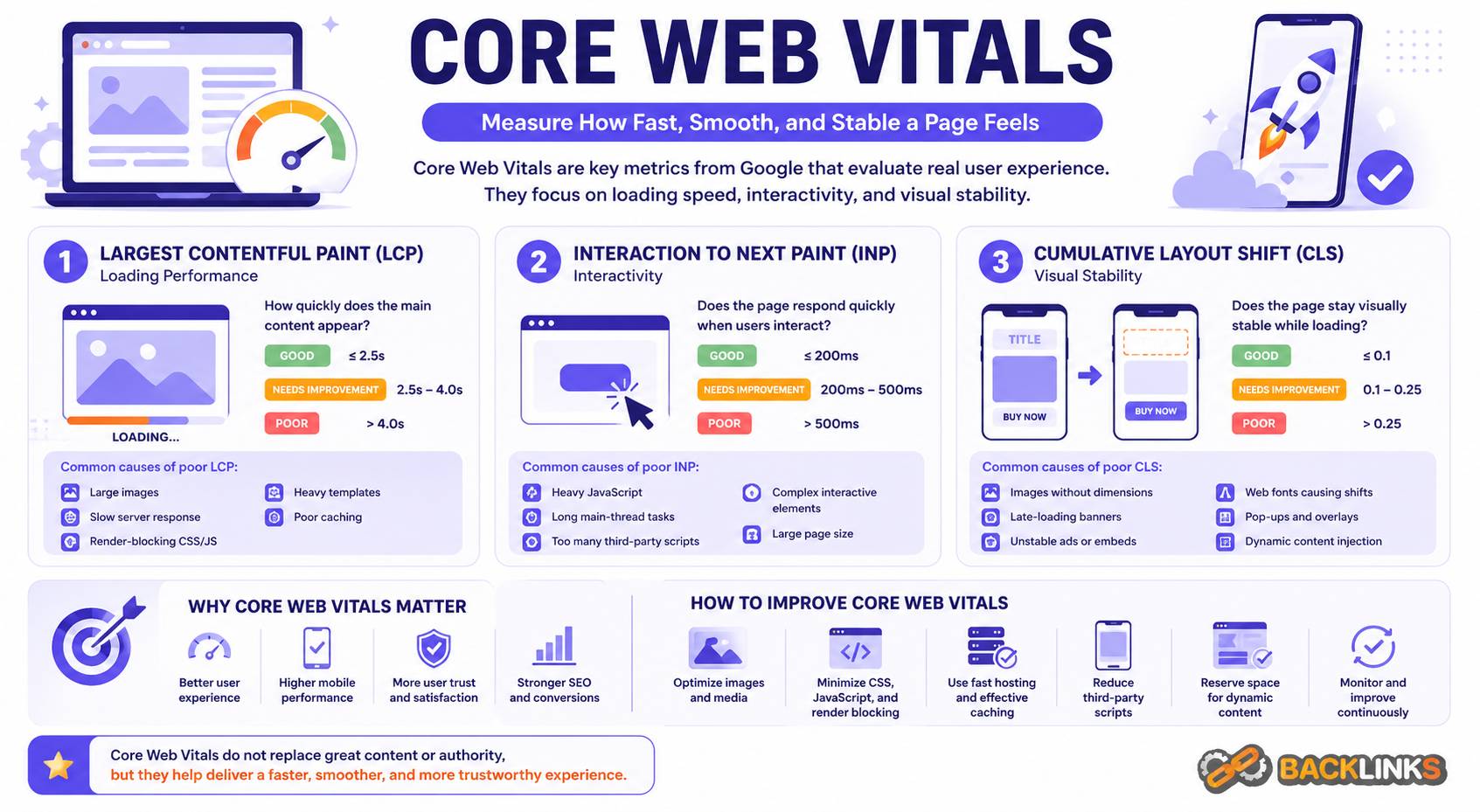
Core web vitals are a set of performance metrics that help measure how users experience a web page. They focus on three practical areas: how quickly the main content loads, how responsive the page feels when users interact with it, and how stable the layout is while the page loads.
Core web vitals are part of technical SEO because they connect website performance with real user experience. A page may have strong content and good keyword targeting, but if it loads slowly, responds poorly, or shifts unexpectedly, users may struggle to engage with it. Search engines want to send users to pages that are useful, accessible, and reliable, so these experience signals matter.
For business owners, marketers, developers, and SEO teams, core web vitals provide a useful framework for improving website quality. They are not the only factor in SEO performance, and they do not replace content relevance or authority. However, they help identify technical problems that can reduce user satisfaction and limit the effectiveness of organic traffic.
What Are Core Web Vitals?
Core web vitals are page experience metrics used to evaluate important aspects of website performance. They measure how a page loads, how quickly it responds to user input, and whether the layout remains stable as elements appear.
The three main core web vitals are:
- Largest Contentful Paint
- Interaction to Next Paint
- Cumulative Layout Shift
Each metric reflects a different part of the user experience. Together, they help website teams move beyond basic page speed scores and focus on how real people experience a page.
Core web vitals are not just technical numbers. They are signals that help explain whether a page feels fast, smooth, and trustworthy.
Why Core Web Vitals Matter
Core web vitals matter because users judge websites quickly. If the main content takes too long to appear, visitors may leave before reading. If a button or menu responds slowly, the page feels frustrating. If elements shift while the user is trying to click or read, the experience feels unstable.
From an SEO perspective, core web vitals matter because they support page experience. They can influence how well a page satisfies users after they arrive from search. Better performance can also support engagement, conversions, and trust.
Core web vitals are especially important for pages where users need to take action, such as service pages, product pages, pricing pages, lead generation pages, checkout pages, and high-value informational content. These pages need to load clearly and respond reliably.
Still, core web vitals should be understood realistically. A page will not rank well only because it has strong performance metrics. Search intent, content quality, topical relevance, internal links, authority, and technical accessibility still matter. Core web vitals are one part of a broader SEO foundation.
How Core Web Vitals Work
Core web vitals work by measuring the user-facing performance of a page. Instead of focusing only on whether a page technically loads, they focus on how that loading process feels to users.
This matters because a page can appear partially loaded but still be difficult to use. A visitor may see a header, but the main content may not be visible yet. A page may look ready, but scripts may delay interaction. A layout may load quickly, but images or ads may shift the content after the user starts reading.
Core web vitals help identify these issues more clearly.
Largest Contentful Paint
Largest Contentful Paint measures how long it takes for the largest visible content element to load in the viewport. This is often a hero image, main heading, banner, featured image, or large text block.
In practical terms, Largest Contentful Paint answers this question:
How quickly does the main visible content appear?
If the largest content element loads slowly, users may feel that the page is slow, even if smaller elements appear earlier. This can create a poor first impression and reduce engagement.
Common causes of poor Largest Contentful Paint include:
- Oversized hero images
- Slow server response time
- Render-blocking CSS or JavaScript
- Unoptimized fonts
- Heavy page templates
- Poor caching
- Slow third-party scripts
Improving Largest Contentful Paint often requires optimizing the most important above-the-fold elements. Large images should be properly sized and compressed. Critical content should not be delayed by unnecessary scripts. Server response time should be fast enough to support quick rendering.
Interaction to Next Paint
Interaction to Next Paint measures how quickly a page responds visually after a user interaction, such as clicking a button, opening a menu, selecting a filter, or typing into a form.
In practical terms, Interaction to Next Paint answers this question:
Does the page respond quickly when users try to interact with it?
A page can look loaded but still feel slow if the browser is busy processing heavy JavaScript. This is common on pages with many scripts, complex front-end frameworks, tracking tags, chat widgets, sliders, or interactive components.
Poor responsiveness can frustrate users. A visitor may click a button and wonder whether anything happened. A mobile user may tap a menu and wait too long for it to open. A form may feel difficult to complete because the page responds slowly.
Common causes of poor Interaction to Next Paint include:
- Heavy JavaScript execution
- Long main-thread tasks
- Too many third-party scripts
- Complex interactive components
- Unoptimized event handlers
- Large front-end frameworks used unnecessarily
Improving Interaction to Next Paint often means reducing JavaScript weight, splitting long tasks, delaying non-essential scripts, simplifying interactive elements, and removing tools that do not provide enough value.
Cumulative Layout Shift
Cumulative Layout Shift measures how much visible content moves unexpectedly while the page loads. A layout shift happens when elements appear, resize, or move after the user has already started viewing the page.
In practical terms, Cumulative Layout Shift answers this question:
Does the page remain visually stable while loading?
Unexpected movement creates a poor experience. A user may try to click a button, but an image loads above it and pushes the button down. A paragraph may move while the user is reading. A banner, ad, font, or embedded element may appear late and shift the page.
Common causes of poor Cumulative Layout Shift include:
- Images without defined dimensions
- Ads or embeds without reserved space
- Late-loading banners
- Web fonts causing text shifts
- Dynamically inserted content
- Cookie notices or popups pushing content
- Responsive elements that resize after loading
Improving Cumulative Layout Shift usually requires reserving space for images, ads, videos, and embedded content. Fonts should be handled carefully. Dynamic content should not push important page elements unexpectedly.
Core Web Vitals and SEO
Core web vitals influence SEO because they are connected to page experience. They help search engines assess whether a page provides a smooth and reliable experience for users.
However, they should not be treated as a shortcut to rankings. A page with excellent core web vitals but weak content may still underperform. A page with strong relevance and authority may still rank even if its performance is imperfect. SEO outcomes depend on many signals working together.
The best way to think about core web vitals is this: they help remove technical friction. They make it easier for users to engage with your content once they arrive. They also help protect the value of your SEO investment by improving the experience behind rankings and traffic.
Core web vitals are most valuable when combined with strong content, clear search intent alignment, good internal linking, clean indexing signals, and a technically sound website structure.
Core Web Vitals and Mobile Experience
Mobile experience is especially important for core web vitals. Many users browse on slower connections or less powerful devices than desktop users. A page that feels fast on a high-end laptop may feel slow on a mobile phone.
Mobile issues often come from heavy images, large JavaScript files, intrusive popups, complex layouts, poor font loading, and third-party scripts. These issues can make mobile pages slow to load, slow to respond, or unstable during use.
When reviewing core web vitals, do not rely only on desktop testing. Important pages should be checked on mobile, especially if they receive mobile search traffic or support conversions.
For many websites, improving mobile performance creates the biggest practical benefit because it affects both search visibility and user satisfaction.
Core Web Vitals and Website Speed
Core web vitals are related to website speed, but they are more specific than a general speed score.
A traditional speed test might tell you that a page is slow. Core web vitals help explain why the page feels slow or unstable. Is the main content delayed? Is the page slow to respond after interaction? Does the layout move while loading?
This distinction matters because different problems require different fixes.
For example, a poor Largest Contentful Paint score may point to a slow hero image or server response issue. A poor Interaction to Next Paint score may point to JavaScript execution. A poor Cumulative Layout Shift score may point to missing image dimensions or unstable ad placements.
Core web vitals make performance optimization more actionable.
Common Core Web Vitals Problems
Many core web vitals issues are created by normal website growth. Over time, teams add new scripts, plugins, design elements, tracking tools, banners, fonts, and media. Each addition may seem small, but together they can slow down or destabilize the page.
Common problems include:
- Large above-the-fold images
- Uncompressed media files
- Slow hosting or server response
- Too much JavaScript
- Render-blocking resources
- Poor mobile optimization
- Too many third-party tools
- Fonts that load inefficiently
- Images or ads without reserved space
- Popups or banners that shift content
- Heavy themes or templates
- Plugins that load scripts sitewide
These problems often affect templates, not just individual pages. For example, a slow product page template can affect hundreds of product pages. A layout shift caused by a global banner can affect the entire site.
How to Improve Core Web Vitals
Improving core web vitals starts with identifying which pages and templates matter most. The goal is not to optimize randomly. Focus first on pages that drive organic traffic, target important keywords, or support conversions.
Improve Largest Contentful Paint
To improve loading performance, review the largest visible element on important pages. If it is an image, make sure it is properly sized, compressed, and prioritized. If it is text, check whether fonts or render-blocking resources delay it.
Useful improvements include:
- Compressing large images
- Using appropriate image dimensions
- Improving server response time
- Reducing render-blocking CSS and JavaScript
- Prioritizing above-the-fold content
- Improving caching
- Removing unnecessary template weight
Improve Interaction to Next Paint
To improve responsiveness, review JavaScript execution and interactive elements. Pages should respond quickly when users click, tap, type, or open menus.
Useful improvements include:
- Reducing unnecessary JavaScript
- Delaying non-essential third-party scripts
- Breaking long tasks into smaller tasks
- Simplifying heavy interactive components
- Removing unused plugins or tools
- Loading scripts only where needed
- Reviewing chat widgets, tracking tags, and animation libraries
Improve Cumulative Layout Shift
To improve visual stability, make sure the page reserves space for elements before they load. Users should not see the layout jump unexpectedly.
Useful improvements include:
- Adding width and height attributes to images
- Reserving space for ads, videos, and embeds
- Avoiding late-loading banners that push content
- Managing font loading carefully
- Preventing dynamic content from moving key elements
- Testing layout stability on mobile devices
How to Audit Core Web Vitals
A core web vitals audit should review both data and experience. Reports are useful, but manual testing helps reveal how pages actually feel.
Start with your most important templates, such as the homepage, service pages, product pages, category pages, blog posts, landing pages, and checkout-related pages. Then identify whether the main issue is loading, responsiveness, or layout stability.
A practical audit should answer:
- Which important pages fail core web vitals?
- Is the issue mobile, desktop, or both?
- Which metric is causing the problem?
- Is the problem page-specific or template-wide?
- What resources are slowing the page down?
- Are third-party scripts contributing?
- Are images and fonts optimized?
- Are layout shifts caused by media, ads, banners, or dynamic content?
- Which fixes will have the highest impact?
The best audits prioritize fixes by business impact, SEO value, and implementation effort.
Common Mistakes to Avoid
One common mistake is focusing only on scores without understanding the user experience. A score can guide diagnosis, but the goal is a faster, smoother, more stable page.
Another mistake is optimizing only the homepage. Organic traffic often lands on deeper pages. Service pages, product pages, category pages, articles, and location pages may be more important for SEO than the homepage.
A third mistake is ignoring third-party scripts. Many performance problems come from tools added for analytics, advertising, chat, heatmaps, reviews, personalization, or tracking. Some may be necessary, but each should be reviewed.
Other mistakes include:
- Treating core web vitals as a one-time project
- Removing useful content only to improve a score
- Testing only desktop performance
- Ignoring template-level issues
- Allowing plugins to load scripts on every page
- Forgetting to test after redesigns or CMS updates
Core web vitals need ongoing monitoring because performance can decline as the website changes.
How Long Core Web Vitals Improvements Take
The implementation timeline depends on the issue. Some improvements are quick, such as compressing images, removing unnecessary scripts, or reserving space for images. Others require development work, template changes, hosting improvements, or a broader performance strategy.
The SEO impact may take longer to appear. Search engines need to recrawl and reassess pages. Field data may also take time to reflect improvements because it is based on real user experience over a period of time.
For this reason, core web vitals should be treated as part of ongoing technical SEO maintenance rather than a one-time fix.
Practical Guidance for Core Web Vitals
The best approach is to prioritize the pages that matter most. Focus on high-value pages, important templates, and mobile experiences first.
Work with developers to identify the root cause of each issue. Avoid vague recommendations such as “make the site faster.” Instead, define specific actions: optimize the hero image, reduce unused JavaScript, delay non-essential scripts, reserve space for embedded content, or improve server response time.
Also involve marketing teams when reviewing third-party tools. If a script does not support measurement, conversion, user experience, or decision-making, it may not deserve to load on important pages.
Core web vitals are not only a technical checklist. They are a quality control system for how users experience your website.
Conclusion
Core web vitals help measure whether a page loads quickly, responds smoothly, and remains visually stable. They are an important part of technical SEO because they connect website performance with real user experience.
Strong core web vitals do not replace useful content, search intent alignment, or authority. But they help remove friction that can weaken engagement, conversions, and search performance.
A practical core web vitals strategy focuses on important pages, mobile users, template-level issues, and the root causes behind poor performance. When managed consistently, core web vitals help create a faster, more stable, and more trustworthy website experience.